Document Discovery With Folio Insights
Your clients' documents hold more information than any template asks for — it just sits in uploaded files, invisible until someone opens and reads them. Folio Insights changes that. Open any folio, and a new Insights tab lets you chat with the documents in plain language. Ask questions, get answers, and review concrete suggestions for updating fields — all without leaving the folio.
And the AI never acts on its own. Every suggestion is a proposal you explicitly accept or reject.
What's New
Conversational AI on every folio
Each folio now has an Insights tab alongside the detail view. Type a question — "Summarise this folio", "What's missing?", "When does this policy renew?" — and the AI reads every uploaded document to answer. A few starter chips suggest useful questions if you don't know where to begin.
Structured proposals, not surprise edits
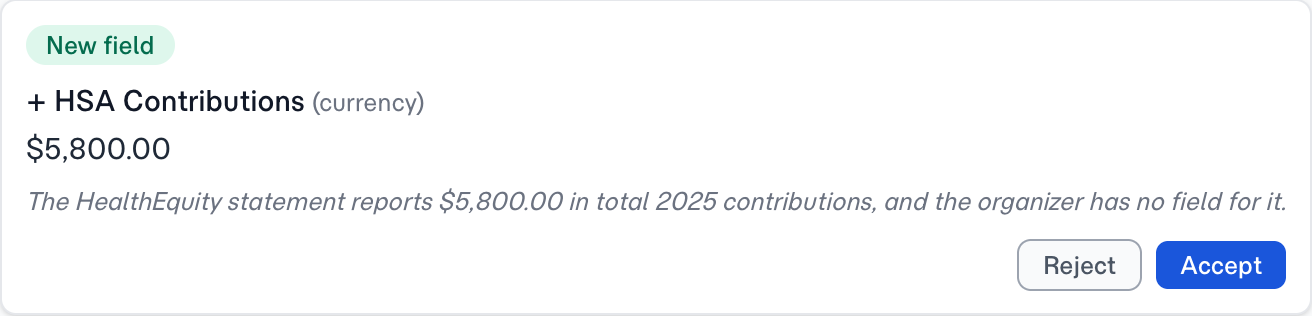
When the AI spots a field it thinks should be updated or added, it surfaces the suggestion as a proposal card in the right-hand panel. Each card shows what's being changed, why, and where the evidence came from. Two buttons: Accept or Reject. Nothing changes on your folio until you click.
Two proposal kinds
| Kind | What it does |
|---|---|
| Field update | Suggests a new value for a field that already exists on the folio |
| Field add | Suggests adding a field that wasn't on the folio's template |
Field-add proposals are particularly useful for ingested documents where the original template didn't anticipate every detail the client actually sent.
Real-time collaboration
Multiple managers can have the same folio open simultaneously. When one asks a question, everyone sees the conversation appear live. When one accepts a proposal, the field updates and the card disappears for everyone — no refresh needed.
Tuned AI under the hood
Insights runs two AI workloads — summarising every file (background) and answering your questions (the conversational part). FolioReady can pair each one with the model best suited for the job, so summaries stay cheap and fast while the chat runs on something stronger. Our support team handles the tuning without any configuration on your side.
How to Use It
- Open any folio with uploaded documents
- Click the Insights tab
- Tap a starter chip or type your own question
- Wait a few seconds while FolioReady summarises the files
- Read the AI's reply and review any proposal cards
- Accept or reject each proposal
- Keep asking follow-up questions as needed
If the folio has no uploaded files yet, you'll see a "Waiting for submissions" empty state — Insights needs documents to work with.
What's Improved
AI usage audit trail
Every Insights question is counted against your company's AI usage and cost totals, with input and output measured separately — the same accounting you already get for document extraction.
Accepted proposals show up in folio history
When you accept a proposal, FolioReady adds an entry to the folio's history noting which field was changed and when. You can always trace a field's value back to the Insights conversation that changed it.
Related
- Folio Insights — Full feature overview with how-it-works and configuration details
- AI Automation — Automatic extraction when a folio is first submitted
- Email Ingestion — Collect documents by email, then explore them with Insights