Adding or changing a BYO key is a company-wide setting, so it's limited to team members with manager access. If you're on the team without it, the AI Models page is still visible — the add and edit buttons are just greyed out. Ask whoever set up your company account to make the change or grant you access.
Connecting...
Plugging In Your Own AI Account
FolioReady's AI features — document summaries, field extraction, and folio insights — run by default on our shared provider account. The cost is bundled into your plan and you never see an API bill. FolioReady also lets you paste in your own Anthropic, OpenAI, or DeepSeek key and route AI calls through your own account instead. That option is there for a reason, but it isn't the right move for everyone.
This guide walks through the decision honestly and, if you decide to plug your own account in, what that actually looks like. It's not a pitch for either path — the right answer depends on whether you already have an AI provider relationship and what you want to get out of one.
Why It Matters
"Bring your own key" sounds like a power-user feature, and in some ways it is. But it changes two practical things about how AI works inside FolioReady: where the bill shows up and which model each feature uses. Both matter in different ways.
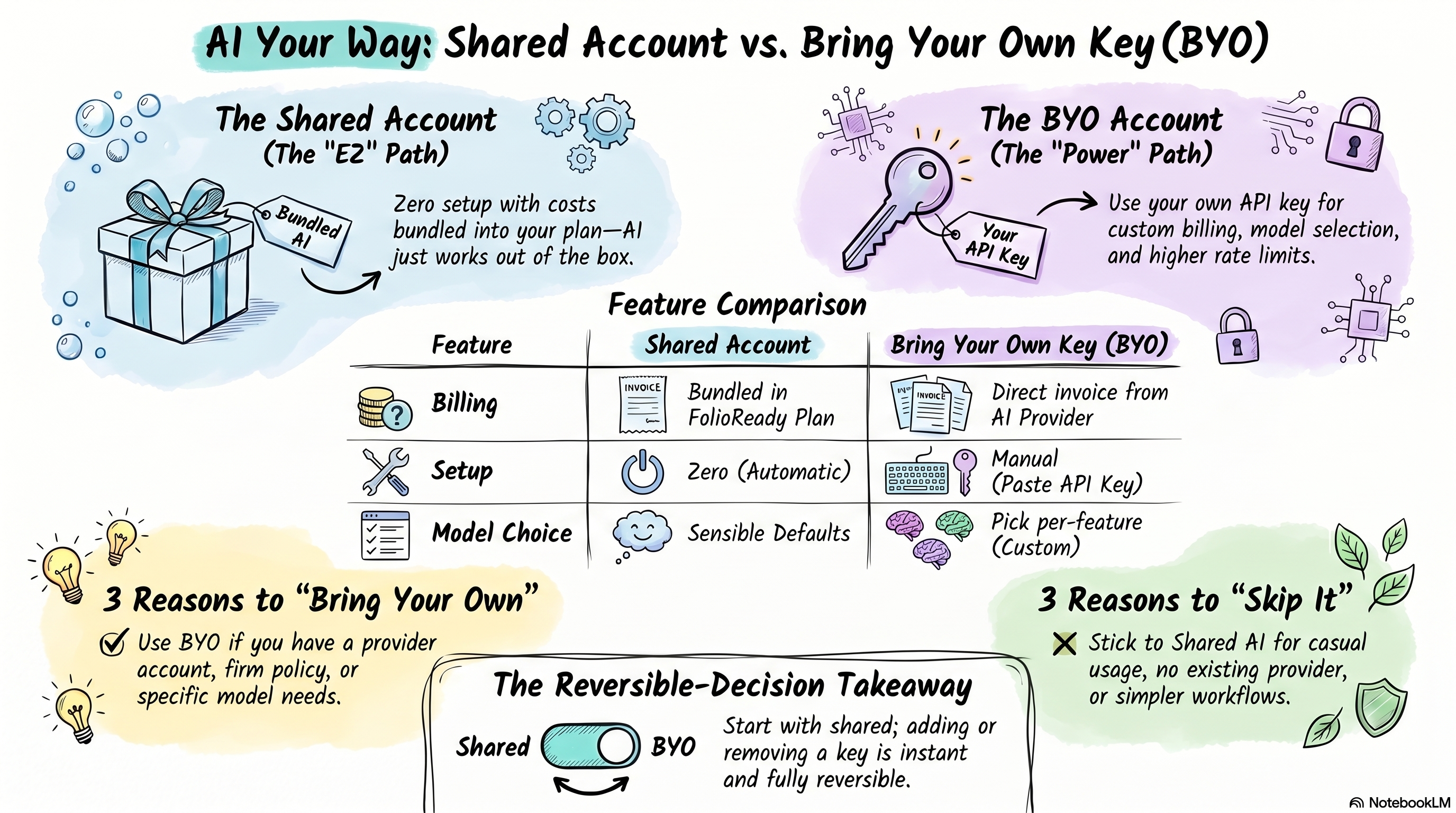
The shared account is there so AI just works — you don't have to sign up anywhere, you don't have to think about keys, and if a model gets deprecated we handle it. The tradeoff is that you're using the models and the budget we've picked. Bringing your own key moves both of those decisions to you.
If you don't have a reason to make those decisions, there's no prize for making them.
What BYO Actually Does for You
Your AI spend goes on your own invoice
Every AI call that uses your key shows up on your provider's dashboard — not on your FolioReady bill. For most advisors this is a non-event; AI usage inside FolioReady is modest. But if your firm has an enterprise agreement with Anthropic, OpenAI, or DeepSeek, a tax treatment that prefers a specific vendor, or a CFO who wants AI spend tracked separately from SaaS, BYO lets you route spend where your finance team already looks.
You pick the model per AI feature
FolioReady's shared account pairs each AI feature with a sensible default model. With your own key you can override that per feature: a cheap fast model for document summaries, a stronger model for folio insights. You're not locked into a one-size-fits-all choice.
Your provider's rate limits, not ours
If you're a heavy user of insights across a large book of business, you may occasionally bump into rate limits on the shared account. Your own provider account usually has higher limits (especially if you're on a paid tier), and if you need more you can negotiate with them directly.
When It Pays Off
You get a clear win from BYO in three situations:
- You already have an Anthropic, OpenAI, or DeepSeek account with usage elsewhere. Adding FolioReady to the same billing relationship keeps everything in one place and often unlocks volume discounts you're already earning.
- You want a specific model FolioReady hasn't chosen for you. Providers ship new models regularly, and sometimes a newer one suits your use case better than the default. BYO lets you pick it.
- Your firm has a policy about AI data handling or vendor selection. Some firms require all AI calls to go through a vendor they've already vetted. BYO satisfies that requirement — the key is yours, the data path is your provider's.
When It Doesn't
BYO is unnecessary complexity in three situations:
- You don't have an Anthropic, OpenAI, or DeepSeek account yet. Signing up with a provider, generating an API key, configuring billing, monitoring usage — these are real tasks. If the only reason to do them is "so I can bring the key to FolioReady," skip it. The shared account does the same job without the paperwork.
- Your AI usage is casual. If you run insights on a couple of folios a week and occasionally generate a synopsis, the bundled AI on your plan is more than enough. The dollars saved by routing through your own account are rounding errors.
- You're chasing a specific model that isn't actually better for your workflow. New models make headlines but the defaults FolioReady ships are chosen for the actual AI actions in the product. A "stronger" model on extraction often produces the same result as the default, just slower and more expensive.
Practical Recommendations
🔑
You'll need manager access
You're a solo advisor who doesn't already use AI tools. Skip BYO. The shared account is the path of least resistance — AI features work from day one and you have nothing to set up or monitor. You can always come back to this later if your needs change.
Your firm already has an OpenAI, Anthropic, or DeepSeek account for other work. Connect it. The setup is a single form: pick a provider, paste your key, save. From there, AI usage shows up on your existing invoice and you're done. Total effort: a few minutes.
You have strong opinions about which AI model runs which feature. BYO is the only way to make that choice stick. Add a default key for your preferred provider, then add per-feature overrides for any features where you want a different model. The system respects the scope you set — a default credential covers everything that doesn't have a more specific override.
You're on the fence. Start with the shared account. Nothing is burned by trying it first — adding a BYO key later takes a few minutes, and removing it falls you right back to the shared account with no data migration. The decision is fully reversible.
💡
Quick answer
Already running AI spend through Anthropic, OpenAI, or DeepSeek for other work? Bring your key — it's a small setup task that consolidates your billing and lets you pick the model per feature. Not using AI providers directly yet? Stay on the shared account. It's the default for a reason.
Related
- Bring Your Own AI Keys — Feature deep-dive with the full setup walkthrough and configuration reference
- AI Automation — How automatic field extraction uses AI under the hood
- Folio Insights — The AI feature most likely to benefit from a stronger model