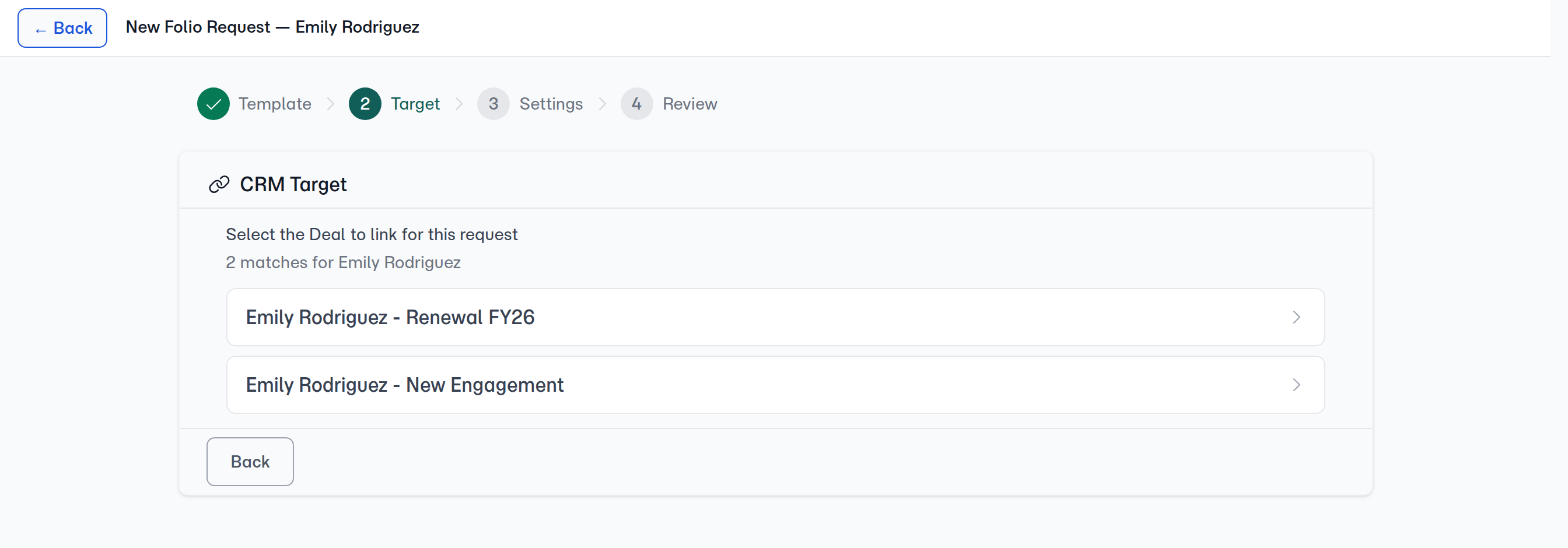
The Target step is the only place FolioReady asks. A folio created without its deal can't be pointed at one from the folio's page afterwards — the choice isn't offered there. If a request went out before its deal existed, create the new request once the deal is in your CRM.
Connecting...
Person or Deal: Where Should a Folio File?
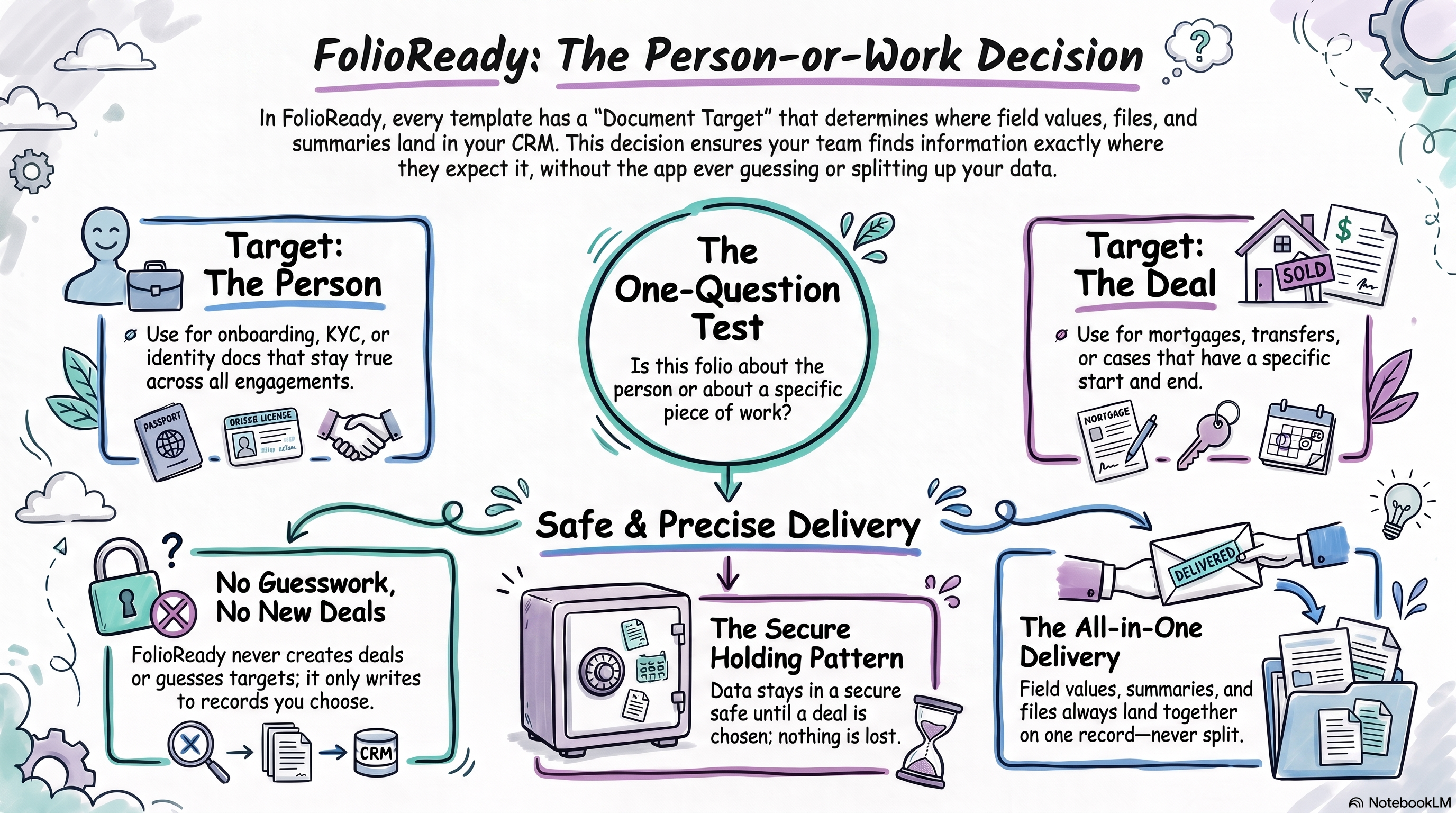
When you connect a CRM and start sending folios, there's a quiet decision waiting for you in the template builder: when everything comes back — the field values, the document summaries, the files themselves — which record in your CRM should it all land on? The client's own record is the obvious answer, and for most templates it's the right one. But it isn't the only one.
This is a decision about where your team looks. It's not a technical setting, and there's no wrong answer that costs you data — but picking the one that matches how your practice actually works saves everyone a hunt later.
Why It Matters
Every folio produces a small pile of evidence: the answers a client typed, the plain-language summaries FolioReady's AI writes for each document, and the documents themselves. That pile has to live somewhere your team will think to look.
If your team works client-by-client — "pull up the Hendersons, what have we got?" — then the client record is where they'll look, and that's where the pile belongs. If your team works engagement-by-engagement — "where's the Henderson refinance up to?" — then the deal is the thing they open, and a pile sitting on the client record is one click further away than it should be, every time.
That's the whole decision. It's about matching the record your team already opens.
Where you set it
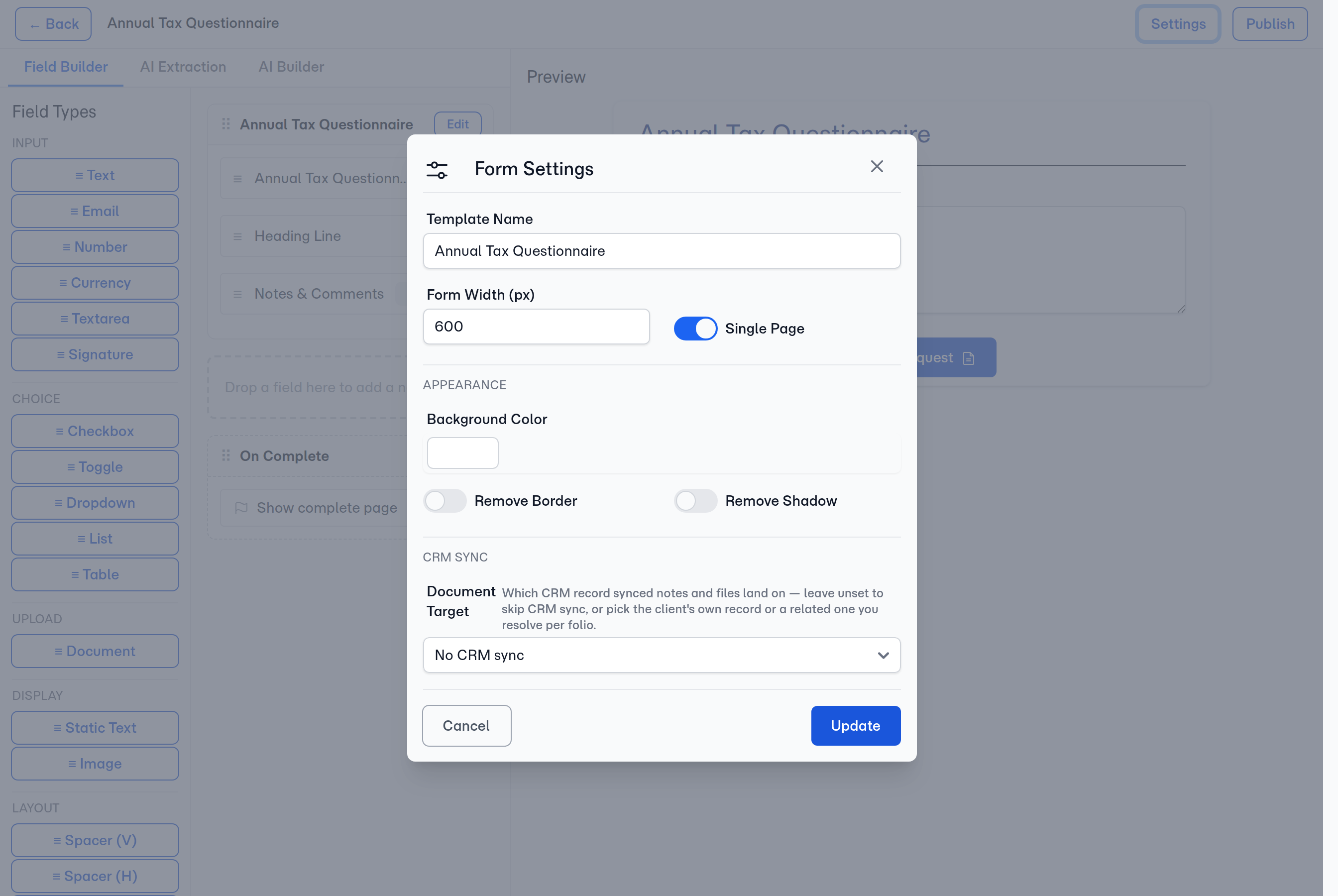
Open a template in the builder, go to Settings, and set Document Target. A new template starts with no CRM target — the No CRM sync option — so nothing is written to your CRM until you choose where it should land. Pick the client's own record for most templates, a related record like a deal for transaction-shaped work, or any other object your CRM exposes. You can change it at any time.
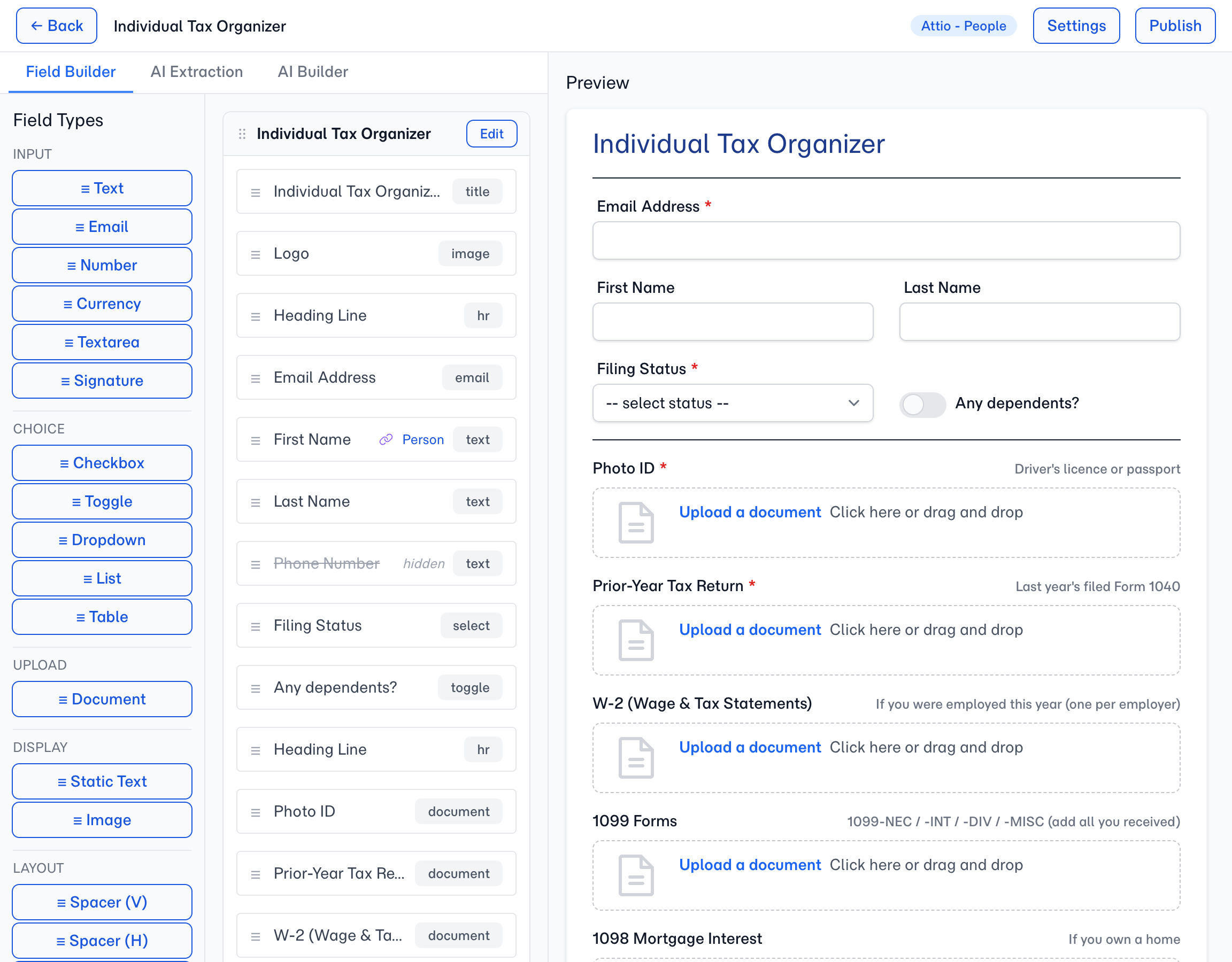
Once a target is set, the builder shows it on the fields that write to it. A mapped field in the Field Builder list carries a link icon and the target's name — Person, Deal, or whatever your CRM calls the object — so you can see at a glance which fields sync and which don't. The AI Extraction tab names the CRM attribute each field writes to, which answers the other half of the same question: not just where the value lands, but what it lands in.
One Template, One Target
The Document Target applies to the whole template, and it moves everything together — field values, document summaries, and mirrored files all land on the same record.
That's deliberate. The alternative — field values on the client, documents on the deal — means anyone looking for the full picture has to know to check two places, and sooner or later someone won't. A folio's paperwork arriving in one piece is worth more than the flexibility of splitting it.
Filing Against the Client
This is the right choice more often than not.
Pick it when the folio is about the person rather than about a particular piece of work: onboarding paperwork, annual KYC refreshes, identity documents, updated contact details. These are facts about the client that stay true across every engagement you'll ever have with them, and they belong on the record that represents the client.
It's also the right choice if you're not using deals in your CRM in any serious way. If your pipeline is light or your CRM is mostly a contact list, filing against the client keeps everything in the one place you actually check.
Filing Against the Deal
Pick this when the folio exists because of a specific piece of work, and would be noise on the client record afterwards.
A mortgage application, a fund transfer, a specific onboarding round, a compliance pack for one transaction — these have a start and an end. The documents matter enormously while the work is live and become historical the moment it closes. Filing them against the deal means the next person to open that deal sees exactly what was collected for it, and the client record doesn't slowly fill up with paperwork from six different engagements.
The test is simple: if someone asked "what documents do we have for this piece of work?", would you want to answer from the client record or the deal? Answer that honestly and you've made the decision.
A deal is the common example, but it isn't the only non-client target. The Document Target lists every object your CRM exposes — so if your workspace defines its own objects, you can file a folio against one of those the same way. The choice is always the same underneath: which record does your team open when they go looking?
How the Deal Gets Chosen
FolioReady is deliberately conservative here, and it's worth knowing why. Two rules:
It never creates a deal. Your pipeline is yours. FolioReady writes into deals that already exist in your CRM — it will never add one on your behalf, because a deal appearing in your pipeline that nobody created is a genuine problem, not a convenience.
It never guesses which one. When you create a folio from a deal-targeted template, FolioReady looks at the deals your CRM already has linked to that client:
- One deal — it's selected for you, and you'll see it named on the folio's Target step. There's nothing ambiguous to resolve.
- Several deals — you pick the right one before the folio goes out. FolioReady shows you the candidates rather than choosing.
- No deals — the request is refused, and the Target step says so. A deal-targeted folio for a client with no deals could only collect documents and sync them nowhere, so FolioReady stops rather than creating one. Create the deal in your CRM first, or pick a template that files against the client.
Silently picking the wrong deal would put a client's mortgage documents on their pension review. Asking you is cheaper than that mistake.
If the Deal Can't Be Resolved
FolioReady refuses the request when it knows the answer is no — this client has no deals, or your workspace has no way to relate deals to clients at all. Both are things you can go and fix, and the Target step names which one it is.
Not being able to ask is different. If your CRM couldn't be reached, the request is still created — blocking there would make sending a document request depend on your CRM being up. Your client sees nothing different: they open the folio, fill it in, and upload documents as normal, and everything they send is collected and held safely in FolioReady.
What doesn't happen is an automatic catch-up. A folio that names no record has nowhere to write, so its CRM updates aren't queued for later — the work stays complete and safe in FolioReady, and files stay put rather than being filed against the wrong record, but none of it reaches your CRM on its own.
⚠️
Choose the target when you send the request
Where This Works Today
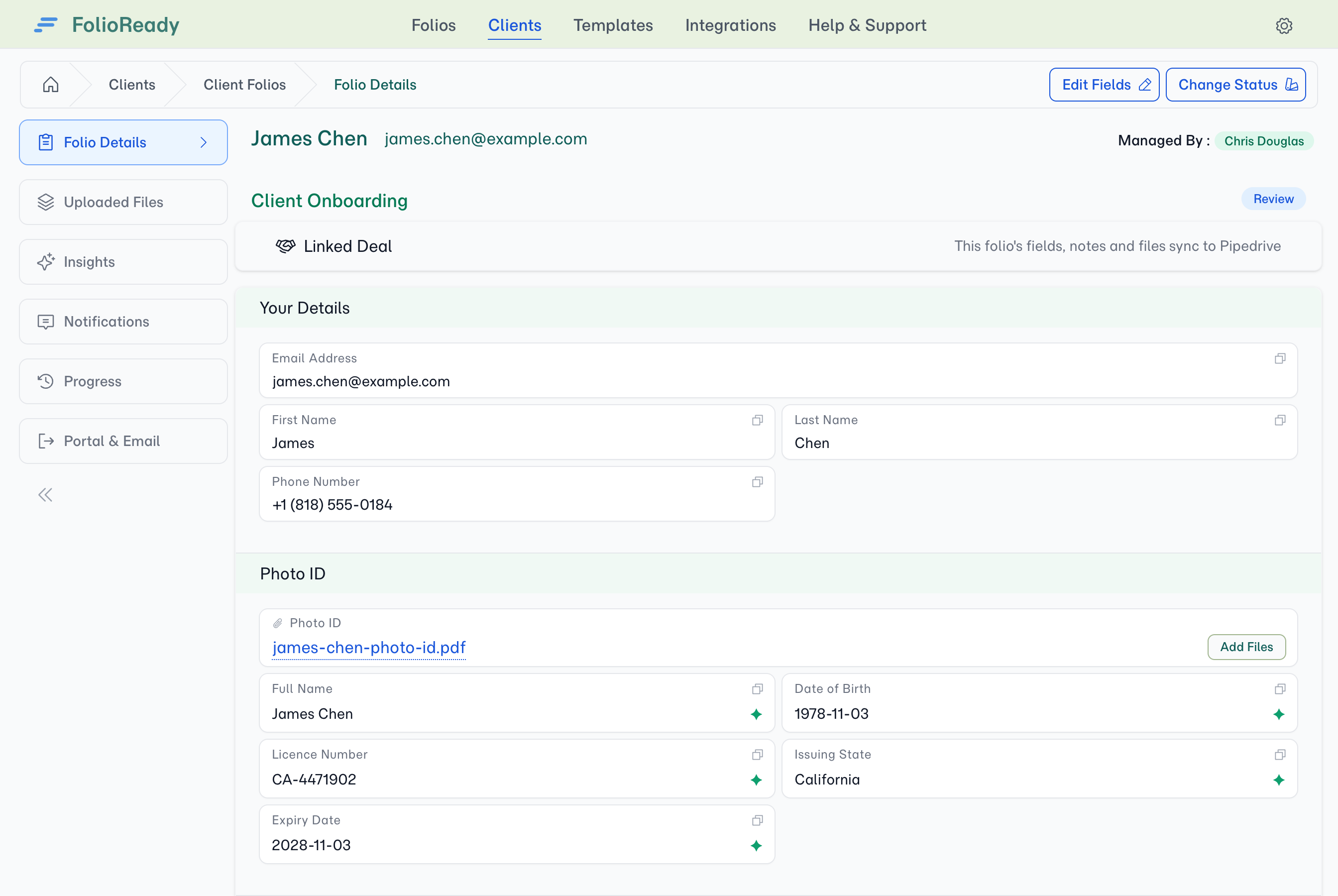
Deal targeting is available with Attio, Pipedrive, and HubSpot. On any of them you'll find Document Target in the template builder's Settings and the deal picker on the folio itself.
Intercom is the exception: its only record is the contact, which is the client, so there's nothing else to file against and no choice to make.
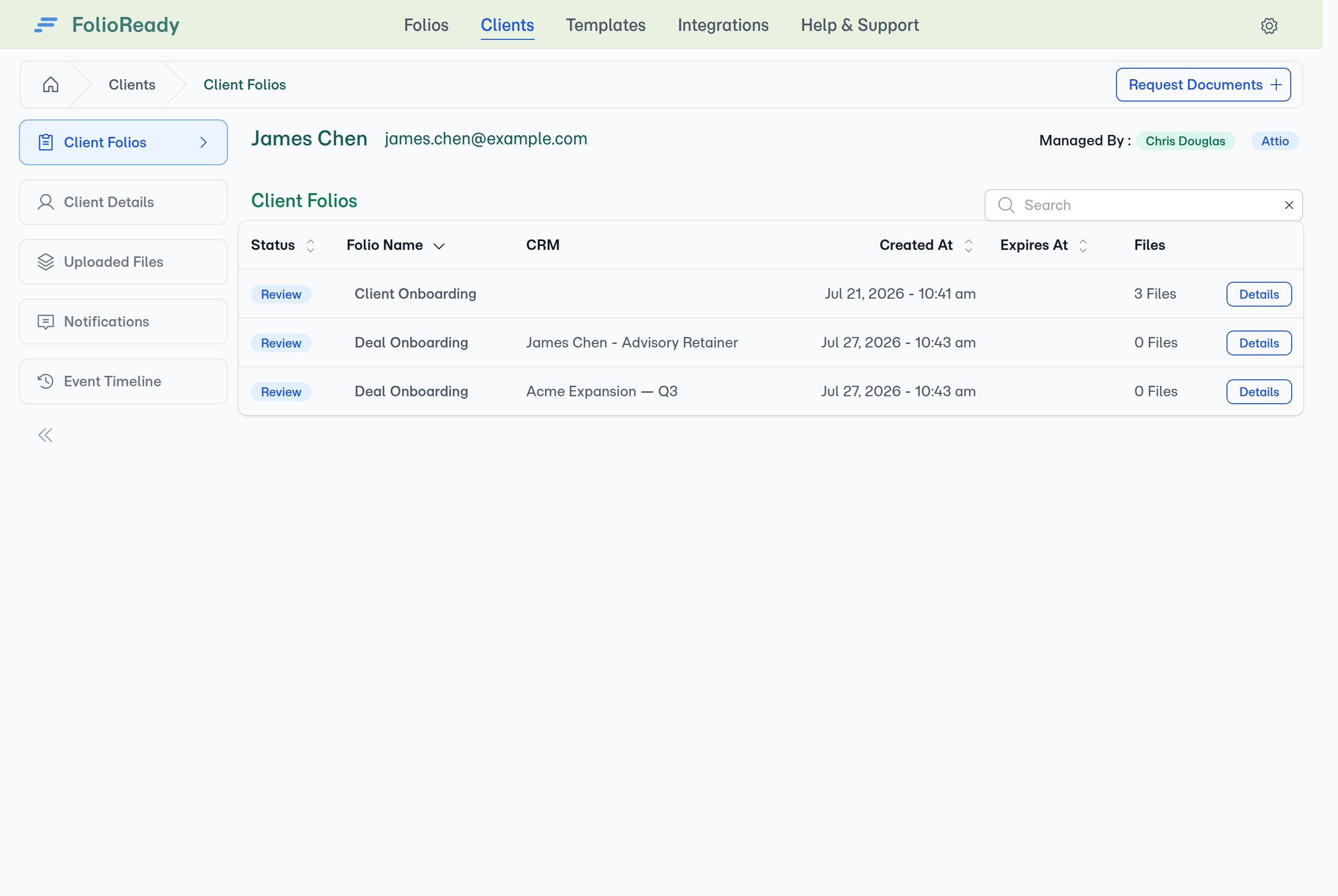
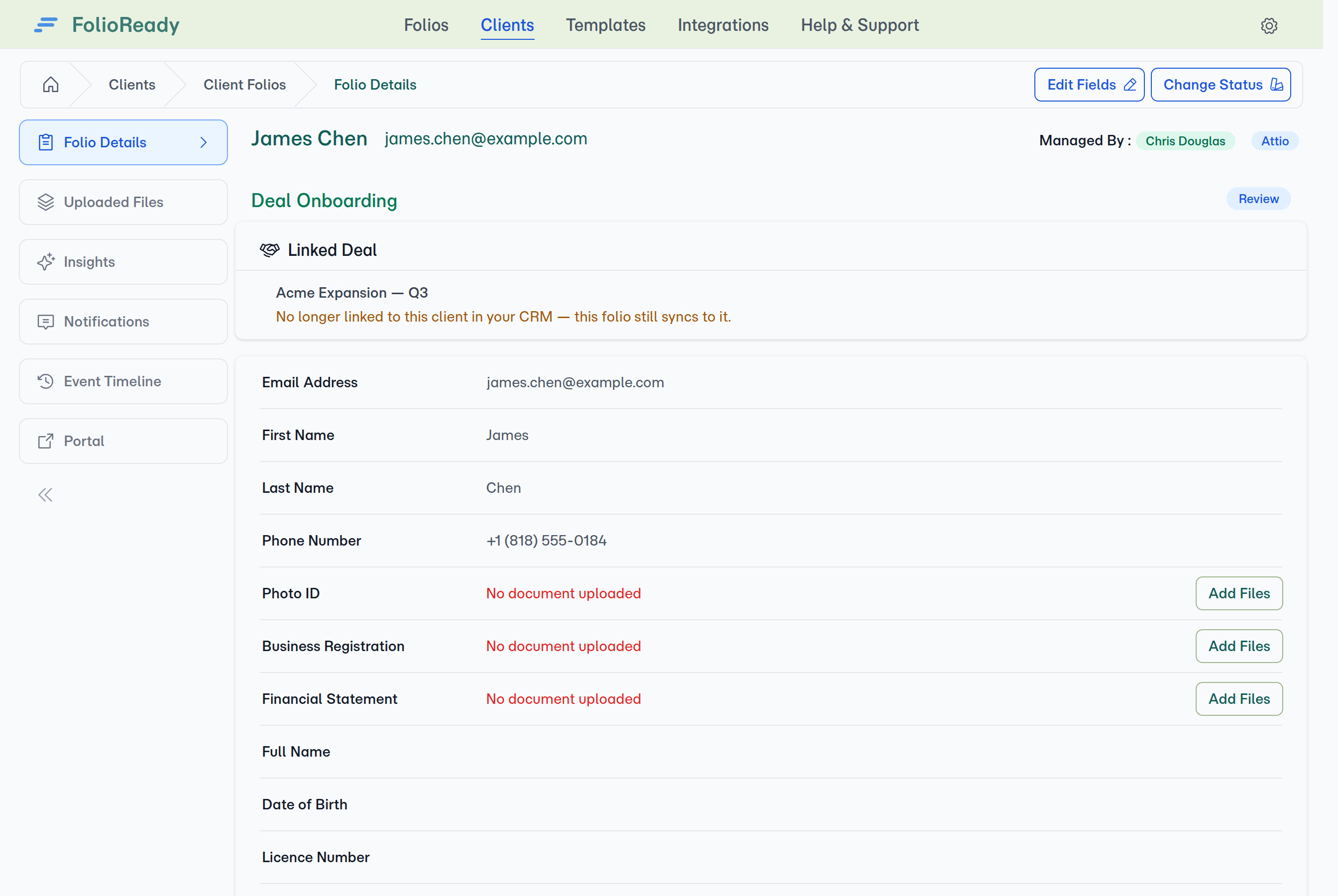
Once a deal is linked, the folio names it — and so does your folio list, so you can see at a glance what each request is filed against. If someone later detaches that deal from the client in your CRM, the folio flags it: it keeps syncing to the deal you chose, but you'll know the link has changed.
On the other supported CRMs, folios file against the client record — which, for most templates, is what you'd choose anyway. If deal-level filing is something your practice needs on a different CRM, tell us; it shapes what we build next.
If You Switch CRMs
A Document Target is a record in a particular CRM, so if you change which CRM FolioReady is connected to, a template still pointing at the old one has nowhere valid to file. FolioReady flags this rather than writing to the wrong place: the template shows a yellow (stale) badge in your template list. Open the template and pick a target in the new CRM, and every request you send from then on files correctly. Requests already sent under the old target don't move across on their own — their documents stay safe in FolioReady, but nothing is written to the new CRM retroactively.
You'll only see this if you actually switch CRMs. Reconnecting the same one leaves your targets untouched.
Practical Recommendations
Most of your templates should stay on the client. Onboarding, KYC, annual reviews, anything about the person rather than a project. Don't change what's working.
Use the deal for transaction-shaped work. If the template exists to support one application, one transfer, one case — file it against the deal. Your team will find it where they're already looking, and your client records stay readable.
Set it before you send, not after. The Document Target applies when a folio is created, so choose it while you're building the template. Changing it later only affects folios created from that point on.
If you're unsure, leave it on the client. That's the default for a reason. You can always create a second template for the deal-shaped work and leave the original alone — templates are cheap.
💡
Quick answer
Is this folio about the person or about a piece of work? Onboarding, KYC, identity — file it against the client, and leave the default alone. A mortgage, a transfer, a specific case — file it against the deal, and pick which deal when the folio is created. FolioReady never creates a deal and never guesses which one: if there's more than one it asks, and if there's none it stops rather than filing it wrong.
Related
- Attio Integration — Set the Document Target, choose a deal, and see what lands where
- Should I Connect My CRM? — Whether a CRM connection earns its place in your setup
- Where Should My Files Live? — Choosing where uploaded documents are stored