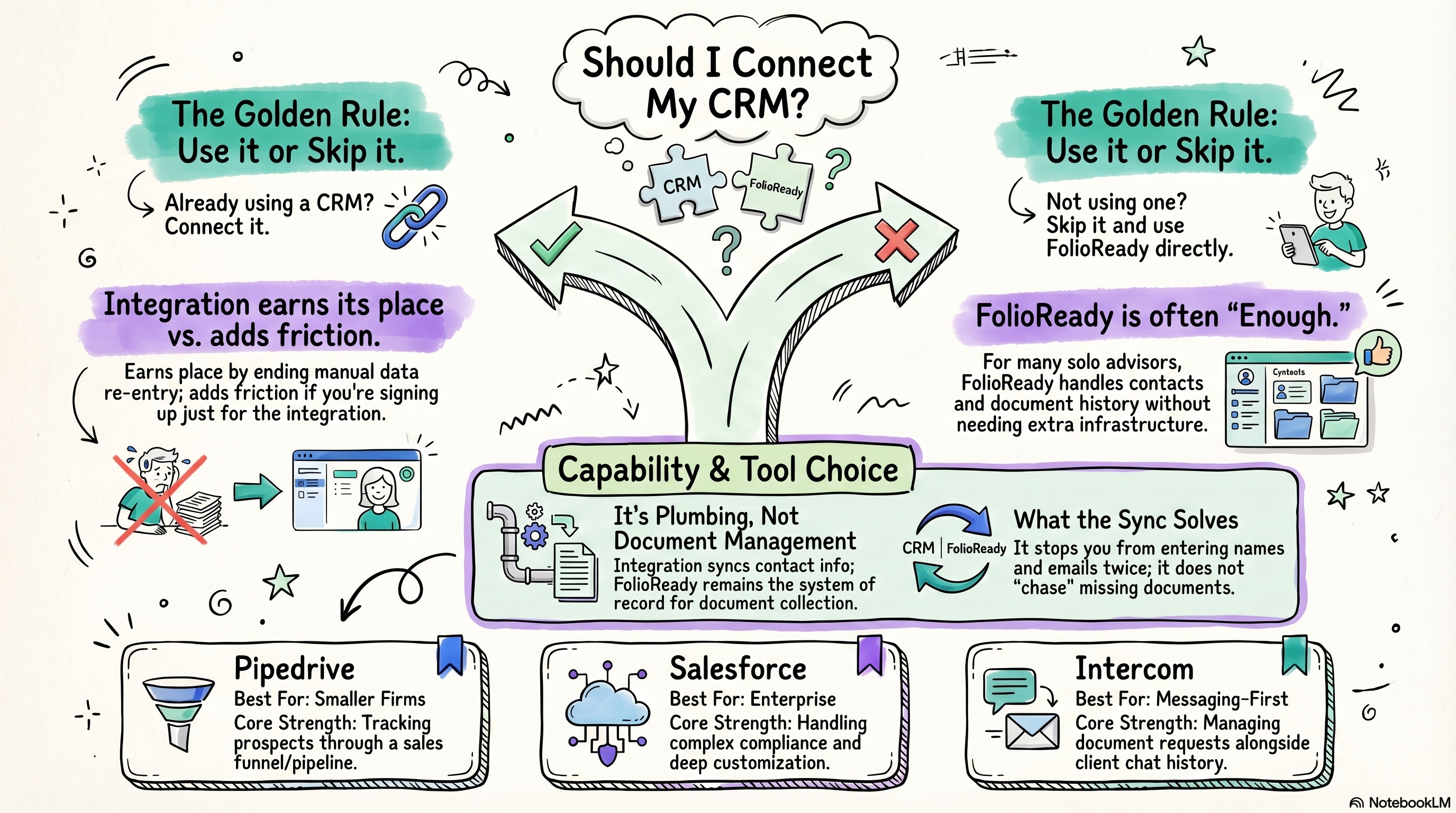
Already using Pipedrive, Salesforce, Intercom, Attio, or HubSpot? Connect it — takes minutes and keeps your contact data consistent. Not using a CRM yet? Skip it. FolioReady handles client contacts and document history on its own, and adding a CRM just for the integration is more overhead than it's worth.
Connecting...
Should I Connect My CRM?
When you first set up FolioReady, one of the questions you'll hit is whether to connect a CRM. It sounds like a productivity win — fewer places to manage client data, everything talking to everything else. But before you go down that path, it's worth pausing to ask whether it's actually solving a problem you have.
This guide will help you think through that decision honestly. The short answer depends almost entirely on whether you're already using a CRM and why.
What a CRM Integration Actually Does for You
The practical benefit of connecting a CRM is contact sync. When a client record exists in both FolioReady and your CRM, you don't have to enter the same name, email, and phone number twice. New document requests can be pre-populated with contact details. Status updates flow in one direction or both, depending on the integration.
What it doesn't do is manage your documents for you. FolioReady is the system of record for document collection — the CRM integration is just plumbing that keeps contact data consistent. It won't organize your pipelines, automate follow-ups, or replace the document-specific workflows that FolioReady handles natively.
If your main frustration is re-entering client contact information, a CRM connection is genuinely useful. If your frustration is something else — chasing clients for missing documents, tracking what's been collected — you're describing a FolioReady problem, and the CRM won't solve it.
The Supported CRMs
FolioReady integrates with Pipedrive, Salesforce, Intercom, Attio, and HubSpot. They're quite different tools serving different use cases, so here's a brief lay of the land.
Pipedrive is built around sales pipelines. It's popular with smaller advisory firms because it's straightforward, not prohibitively expensive, and doesn't require a dedicated admin to run. If you're tracking prospects through a funnel — first meeting, proposal, onboarding — Pipedrive maps to that workflow cleanly. The FolioReady integration syncs contacts and can file document requests against a specific deal.
Salesforce is the enterprise option. If you're already on Salesforce, you almost certainly have a reason to be — it's deeply customizable and handles complex compliance requirements that smaller tools don't. The integration with FolioReady is more configurable as a result, but also more involved to set up. Solo advisors rarely need Salesforce, and if you're not already using it, this isn't the moment to start.
HubSpot sits between the two. It's the common choice for firms that want a CRM and a marketing stack in one place, and its free tier means a lot of practices already have an account whether or not they use it seriously. The integration syncs contacts and can file requests against a deal, so it suits you if client work is already tracked as deals in HubSpot.
Attio is the newest of the five and the most flexible about how your data is shaped — you define the objects rather than working around someone else's. That suits firms whose client work doesn't fit a standard sales pipeline. The integration syncs contacts and files requests against whichever object you nominate.
Intercom is a customer messaging platform, not a traditional CRM. It's focused on client communication — live chat, onboarding flows, automated messages. The integration is most useful if you're using Intercom for client support and want document request activity visible alongside your conversation history. It's the least common choice for financial advisors but makes sense in specific contexts.
If you need document requests filed against a specific piece of work rather than just a person, that's available on Pipedrive, HubSpot, and Attio. Person or Deal covers the choice in full.
Do You Actually Need a CRM Integration?
Here's a useful way to think about it: what problem are you trying to solve that FolioReady alone doesn't solve?
FolioReady stores client contact information, tracks document requests, and maintains a history of what's been collected from whom. For many solo advisors, that covers the full scope of what a CRM would do in a document collection context. If you have 50 active clients and you're not running a complex sales pipeline, FolioReady may simply be enough.
The integration earns its place when:
- You have an existing CRM with years of client records and you don't want to manually migrate or duplicate them
- Your business development and client servicing happen in the same tool, and you need document activity visible inside it
- You're already paying for a CRM for other reasons and want to avoid a second silo
The integration adds friction when:
- You're being sold on the idea that "more integrations = more professional"
- You'd be signing up for a new CRM specifically to connect to FolioReady
- Your client list is manageable and you don't have a clear reason to need contact sync
There's nothing wrong with a lean setup. A lot of advisors run well with FolioReady handling document collection and a simple spreadsheet or even just email for everything else. Don't add infrastructure complexity because it feels like something you're supposed to have.
Practical Recommendations
If you're already in a CRM: Connect it. The setup takes under ten minutes for most of them, and a bit longer for Salesforce. Once it's running, you'll stop thinking about it — contacts sync, data stays consistent, and you're not entering the same information twice. It's a small time investment that pays for itself quickly.
If you're not in a CRM: Don't add one just for this. FolioReady's built-in contact management is designed for exactly your situation — a solo advisor with a focused client list who needs document collection to work cleanly without a lot of overhead. Use it directly and revisit the CRM question when you have a specific reason to need one.
If you're not sure which CRM fits: That's a bigger conversation than this guide can answer, but the short version is: Pipedrive for straightforward pipeline management, HubSpot if you want CRM and marketing in one place, Attio if your client work doesn't fit a standard pipeline, Salesforce if you have compliance requirements that demand it, and Intercom if client communication is the core use case. If none of those descriptions fit your situation, you probably don't need one.
💡
Quick answer