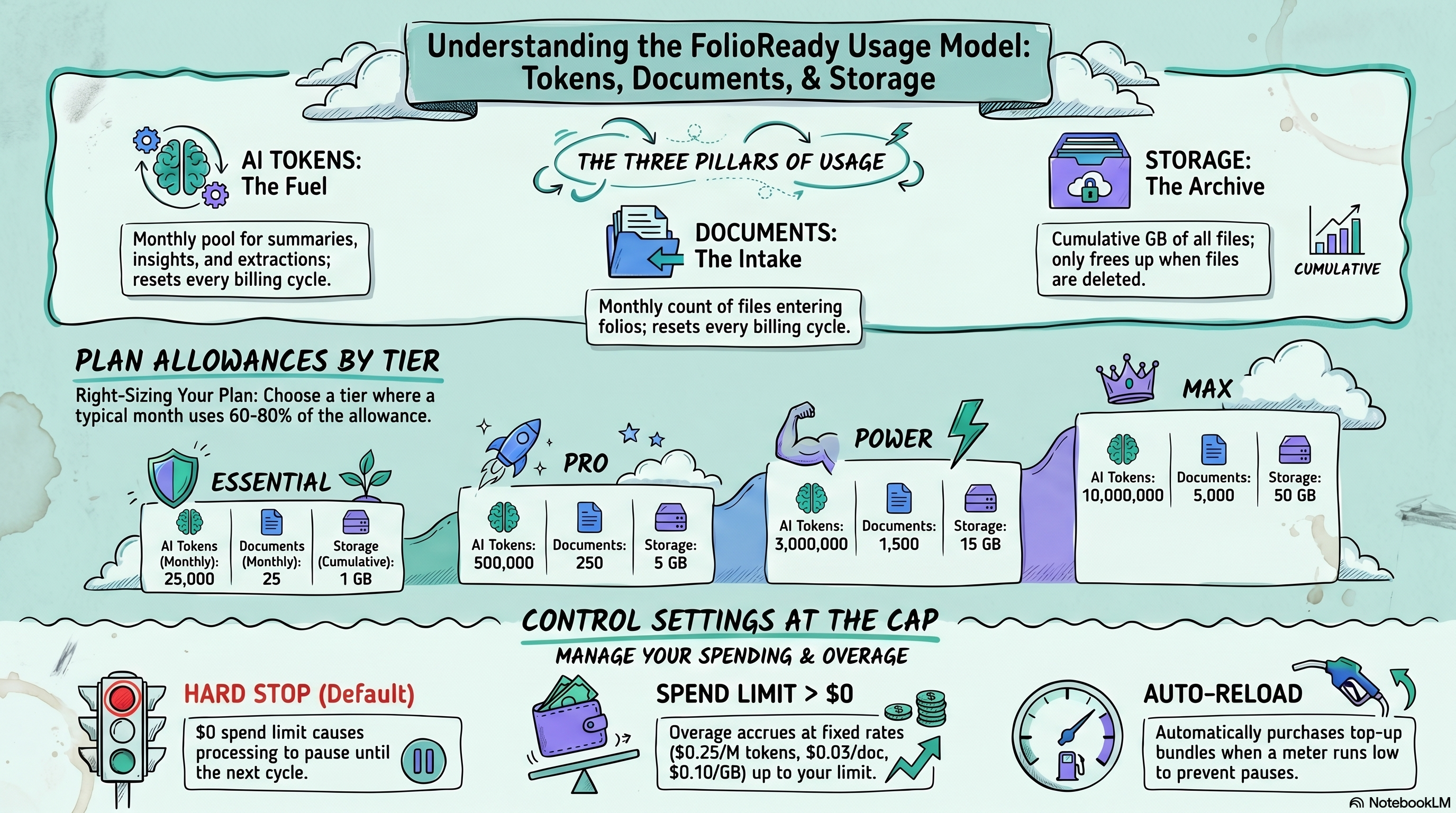
Tokens cover the AI doing things for you (summaries, insights, extraction). Documents cover the files your clients submit. Storage covers the bytes those files occupy. Each plan includes a monthly pool of tokens and documents plus a cumulative storage cap. What happens past the cap is entirely your call — auto-reload, spend cap, or hard stop.
Connecting...
How Tokens, Documents, and Storage Work
FolioReady plans are priced around three things you actually consume: the AI work the platform does on your behalf (summarising documents, answering questions about a folio, extracting fields), the documents your clients submit through the portal or by email, and the storage those documents occupy. Each plan ships with a monthly pool of AI tokens, a monthly pool of documents, and a cumulative storage allowance. The Usage dashboard shows what's been used and what's left. This guide explains exactly what each unit covers, what happens when you run out, and how to size your plan so you don't think about the meter for a normal month.
Why This Matters
Three units mean fewer surprises
Most "usage-based" SaaS products price on a single number — folios, contacts, seats — and then surprise you with overage when AI usage spikes. Splitting tokens, documents, and storage means a heavy-AI month doesn't burn your document allowance, a busy document month doesn't blow up because of a few extra AI insights conversations, and long-term retention is accounted for separately from current-cycle activity. Each meter moves independently.
You can predict your bill before the cycle ends
The Usage dashboard isn't a retrospective report — it's a live view of your current cycle. You can look at it on day fifteen and know roughly where you'll land. Combined with the spend limit, this means the highest your bill can ever be is a number you set yourself.
The model gets out of the way for normal months
For most advisors, a normal month sits comfortably inside the included allowance. The point of the system isn't to nickel-and-dime you — it's to give you a fair, predictable price that scales with your business. You only ever pay overage if you actively choose to (by enabling auto-reload) or set a spend limit above zero.
What's a Token?
A token is one unit of AI fuel. Tokens cover every AI feature that runs against your data:
- Document Synopsis — the one-paragraph summary on each uploaded file. Cheap; a few thousand tokens per document.
- AI Extraction — automatic field population from uploaded documents. Mid-cost; ten to thirty thousand tokens per document depending on length and number of fields.
- Folio Insights — the cross-document Q&A on a folio. Variable; a single insight conversation can be anywhere from twenty thousand to several hundred thousand tokens, depending on the size of the folio and the depth of the conversation.
- AI Builder — the natural-language template builder. Mid-cost; a typical template build is twenty to fifty thousand tokens.
Tokens are big numbers because AI work is measured in tokens — pieces of text the model reads or writes. Different AI features run on different models, and lighter models consume the meter slower than heavier ones, so the figures above are typical ranges rather than fixed prices. The Usage dashboard's activity log shows the exact token cost of every call.
If you've connected your own AI provider via Bring Your Own AI Keys, AI calls don't consume your FolioReady tokens — they go on your own provider invoice instead. The token meter only moves for AI calls that run through the shared FolioReady account.
What's a Document?
A document is one file that lands in a client folio — uploaded by the client through the portal, ingested from an email attachment, or added by a manager. One file, one document. Most months a folio collects between five and twenty documents, but it varies wildly with workflow.
The document counter resets at the start of every cycle. A file that was counted last month isn't re-counted this month if it stays on the folio.
What's Storage?
Storage is the total bytes you have on file at any moment. Unlike tokens and documents, the storage meter is cumulative — it doesn't reset each cycle. If you upload a 2 MB statement in January and never delete it, that 2 MB still counts toward your storage allowance in June.
Deleting a file from the manager UI returns its bytes to your allowance immediately. There's no "trash" or 30-day window — once a file is deleted, the storage frees up.
Plan Allowances
Every plan includes a monthly pool of tokens and documents plus a cumulative storage allowance. The token and document pools reset the day your billing period turns over.
| Plan | AI tokens / month | Documents / month | Storage |
|---|---|---|---|
| Essential | 25,000 | 25 | 1 GB |
| Pro | 500,000 | 250 | 5 GB |
| Power | 3,000,000 | 1,500 | 15 GB |
| Max | 10,000,000 | 5,000 | 50 GB |
| Enterprise | by contract | by contract | by contract |
For sizing: 25 documents per month is a sole practitioner running two or three light client engagements; 250 documents is a small practice handling ten to twenty active clients; 1,500 is a busy multi-advisor team; 5,000 is enterprise-adjacent volume.
On the AI side: 25,000 tokens is a couple of synopses or one short insights conversation. 500,000 is enough for daily synopsis and weekly insights on most folios. 3,000,000 is heavy AI use across the whole book.
Storage scales to roughly twelve months of typical document throughput at modest average file size (~500 KB), so under normal use you'll fill it well before the cap. If you hold long retention or archive scanned PDFs, you may bump against it sooner.
What Happens When You Run Out
Three settings on the Usage dashboard decide what happens when you hit the included allowance: auto-reload, the spend limit, and the implicit fallback when both are off. Tokens and documents are independent — documents can be auto-reloading while tokens are not. Storage doesn't have its own auto-reload (because it's cumulative, not consumed) but a non-zero spend limit still lets uploads run past the cap into overage.
Auto-reload off, spend limit $0
Processing pauses for that ledger until the next cycle (for tokens or documents) or until you delete files (for storage). Uploads queue, AI calls return a polite "your plan allowance has been reached" message. You're guaranteed never to be billed beyond the plan price.
Auto-reload off, spend limit > $0
You'll accumulate overage — usage beyond the included allowance, billed at the published rates at cycle end:
- $0.03 per document of overage
- $0.25 per million tokens of overage
- $0.10 per GB-month of storage overage
The spend limit caps that overage. Once accumulated overage charges would exceed the limit, processing pauses for the rest of the cycle.
Auto-reload on
When the meter drops below your top-up threshold, FolioReady purchases a top-up automatically — say, +100 documents at +$3. The top-up appears as a charge at cycle end and the meter refills immediately. If a top-up would push your cycle's billing past the spend limit, the top-up doesn't fire and processing pauses.
The practical effect: with auto-reload on and a sane spend limit, your portal never stops working as long as there's headroom under the cap. You may pay a little overage at cycle end if the month was busier than expected, but never more than the cap you set.
How to Estimate Your Usage
You don't have to guess; the Usage dashboard shows real numbers. But for picking a plan or budgeting a month ahead, this rough math is usually close enough:
- Count typical folios per month. A folio is a single client engagement (an onboarding, a tax pack, a compliance review). Multiply by the average number of documents the client uploads — five for a simple onboarding, twenty for a tax season folder.
- Pick an AI tier.Light AI: synopsis only, no insights, no AI extraction. Budget around 5,000 tokens per folio. Medium AI: synopsis plus extraction. Around 30,000 tokens per folio. Heavy AI: synopsis, extraction, and a couple of insights conversations per folio. 60,000 to 150,000 tokens per folio.
- Estimate storage growth. Multiply documents per month by your typical file size — 200 KB for forms, 1–5 MB for scanned PDFs. Storage is cumulative, so factor in how long you hold files before archiving or deleting.
Multiply, compare against the table above, and pick the plan that puts your typical month at 60–80% of the included allowance. That gives you headroom for a busy stretch without pushing you into the next tier needlessly.
Tips
- Watch the meters for one full cycle before you optimise. The Usage dashboard's activity log is more honest than any spreadsheet. After one cycle you'll know exactly which feature is your dominant cost — that's the lever to pull if anything.
- Use the spend limit as a circuit breaker, not a budget. Set it well above your expected overage so it only kicks in if something has gone wrong (a runaway integration, an accidental bulk upload). If you find yourself routinely brushing against it, that's a signal to upgrade.
- Auto-reload thresholds work best near the bottom. Set the threshold low enough that the top-up only fires when you'd otherwise stop processing — not at 50% of allowance, where it just flips your effective allowance up arbitrarily. A threshold around 5–10% of the included amount catches genuine shortfalls.
- BYO AI keys reduce token consumption to zero. If your AI usage is heavy and predictable, plugging in your own provider key moves all token spend to your own provider invoice and the FolioReady token meter stops moving. The document and storage meters move normally.
- Delete to recover storage. Storage is the one meter you can free up mid-cycle. If you're close to the cap and an old folio's files are no longer needed, archive them out and delete — the bytes return to your allowance immediately.
💡
Quick framing
Related
- Pricing — The four plans, their allowances, and what they cost
- Manager Usage Dashboard — The page where you watch the meters and configure auto-reload and the spend limit
- Bring Your Own AI Keys — Route AI calls through your own provider account so token usage doesn't draw on your FolioReady plan