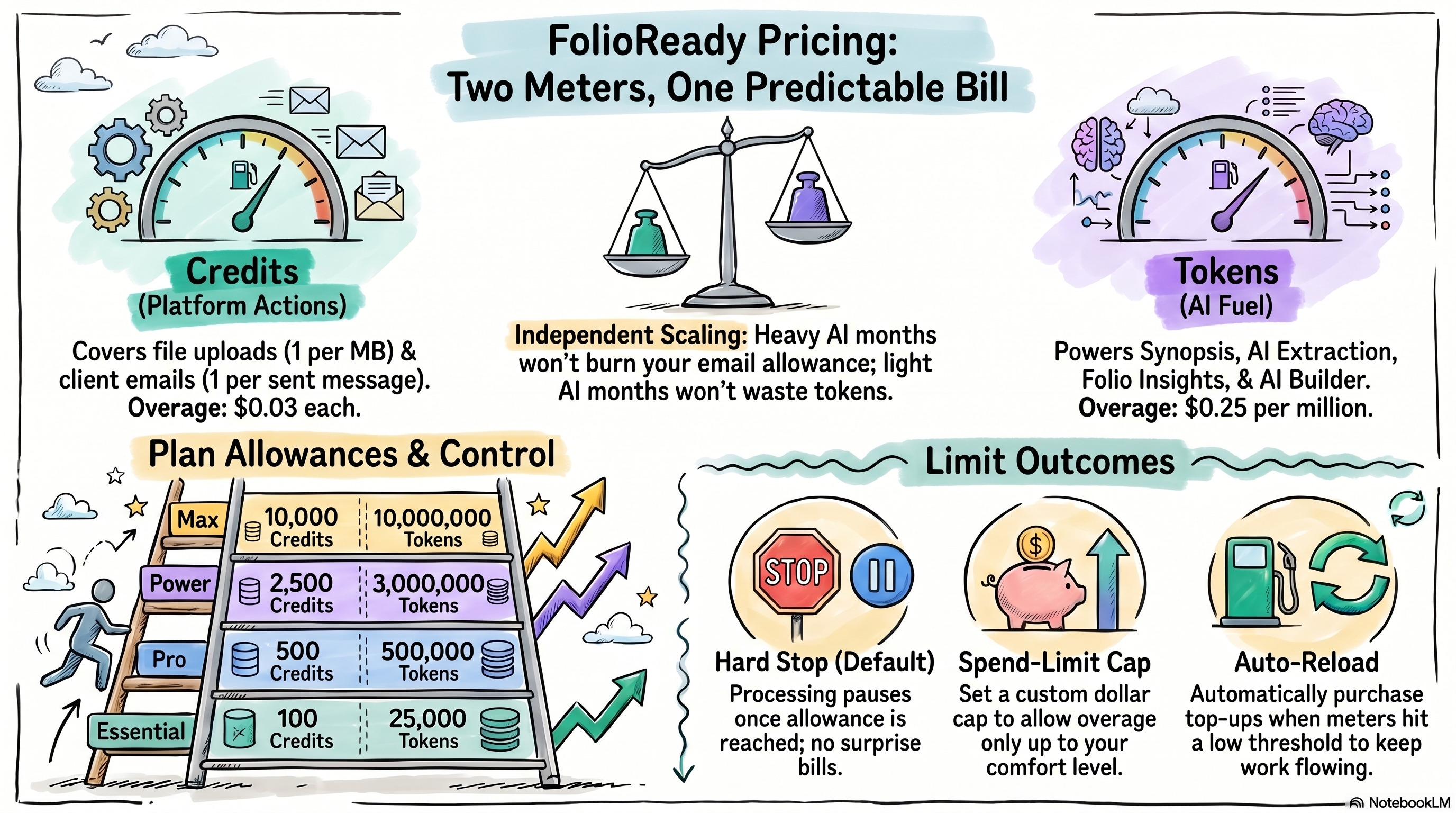
Credits cover the platform doing things for clients (uploads, emails). Tokens cover the AI doing things for you (summaries, insights, extraction). Each plan includes a monthly pool of both. What happens past the pool is entirely your call — auto-reload, spend cap, or hard stop.
Connecting...
How Credits and Tokens Work
FolioReady plans are priced around two things you actually consume: the work the platform does for you (uploading files, sending client emails) and the work the AI does on your behalf (summarising documents, answering questions about a folio, extracting fields). Each plan ships with a monthly pool of both, and the Usage dashboard shows what's been used and what's left. This guide explains exactly what each unit covers, what happens when you run out, and how to size your plan so you don't think about the meter for a normal month.
Why This Matters
Two units mean fewer surprises
Most "usage-based" SaaS products price on a single number — folios, contacts, seats — and then surprise you with overage when AI usage spikes. Splitting credits and tokens means light-AI months don't burn your folio allowance, and heavy-AI months don't blow up because of a few extra emails. Each meter moves independently.
You can predict your bill before the cycle ends
The Usage dashboard isn't a retrospective report — it's a live view of your current cycle. You can look at it on day fifteen and know roughly where you'll land. Combined with the spend limit, this means the highest your bill can ever be is a number you set yourself.
The model gets out of the way for normal months
For most advisors, a normal month sits comfortably inside the included allowance. The point of the system isn't to nickel-and-dime you — it's to give you a fair, predictable price that scales with your business. You only ever pay overage if you actively choose to (by enabling auto-reload) or set a spend limit above zero.
What's a Credit?
A credit is one platform action — the kinds of work FolioReady does that have nothing to do with AI:
- File uploads. One credit per megabyte, rounded up. A 200KB PDF costs 1 credit. A 4.3MB scan costs 5 credits. Most documents you receive — signed forms, statements, ID scans — are well under 1MB, so most uploads are 1 credit each.
- Client emails. One credit per email sent. That includes reminders, manual nudges, and the automated emails templates schedule. Internal notifications inside the app don't cost a credit.
That's it. Credits don't move when you build a template, log in, view a folio, or click around. They move when FolioReady does something for a client on your behalf.
What's a Token?
A token is one unit of AI fuel. Tokens cover every AI feature that runs against your data:
- Document Synopsis — the one-paragraph summary on each uploaded file. Cheap; a few thousand tokens per document.
- AI Extraction — automatic field population from uploaded documents. Mid-cost; ten to thirty thousand tokens per document depending on length and number of fields.
- Folio Insights — the cross-document Q&A on a folio. Variable; a single insight conversation can be anywhere from twenty thousand to several hundred thousand tokens, depending on the size of the folio and the depth of the conversation.
- AI Builder — the natural-language template builder. Mid-cost; a typical template build is twenty to fifty thousand tokens.
Tokens are bigger numbers because AI work is measured in tokens — pieces of text the model reads or writes. Different AI features run on different models, and lighter models consume the meter slower than heavier ones, so the figures above are typical ranges rather than fixed prices. The Usage dashboard's activity log shows the exact token cost of every call.
If you've connected your own AI provider via Bring Your Own AI Keys, AI calls don't consume your FolioReady tokens — they go on your own provider invoice instead. The token meter only moves for AI calls that run through the shared FolioReady account.
Plan Allowances
Every plan includes a monthly pool of both currencies. The cycle resets the day your billing period turns over.
| Plan | Credits / month | Tokens / month |
|---|---|---|
| Essential | 100 | 25,000 |
| Pro | 500 | 500,000 |
| Power | 2,500 | 3,000,000 |
| Max | 10,000 | 10,000,000 |
| Enterprise | by contract | by contract |
For comparison: 100 credits is roughly 100 single-page documents and a handful of emails. 500 credits is a small advisor practice running ten to fifteen new folios a month. 2,500 credits is comfortably a busy practice with regular client correspondence.
On the AI side: 25,000 tokens is a couple of synopses or one short insights conversation. 500,000 is enough for daily synopsis and weekly insights on most folios. 3,000,000 is heavy AI use across the whole book.
What Happens When You Run Out
Three settings on the Usage dashboard decide what happens when you hit the included allowance: auto-reload, the spend limit, and the implicit fallback when both are off. Each currency is independent — credits can be auto-reloading while tokens are not.
Auto-reload off, spend limit $0
Processing pauses for that currency until the next cycle. Uploads queue, emails wait, AI calls return a polite "your plan allowance has been reached" message. You're guaranteed never to be billed beyond the plan price.
Auto-reload off, spend limit > $0
You'll accumulate overage — credits used beyond the included allowance, billed at the published rates at cycle end:
- $0.03 per credit of overage
- $0.25 per million tokens of overage
The spend limit caps that overage. Once accumulated overage charges would exceed the limit, processing pauses for the rest of the cycle.
Auto-reload on
When the meter drops below your top-up threshold, FolioReady purchases a top-up automatically — say, +500 credits at +$15. The top-up appears as a charge at cycle end and the meter refills immediately. If a top-up would push your cycle's billing past the spend limit, the top-up doesn't fire and processing pauses.
The practical effect: with auto-reload on and a sane spend limit, your portal never stops working as long as there's headroom under the cap. You may pay a little overage at cycle end if the month was busier than expected, but never more than the cap you set.
How to Estimate Your Usage
You don't have to guess; the Usage dashboard shows real numbers. But for picking a plan or budgeting a month ahead, this rough math is usually close enough:
- Count typical folios per month. A folio is a single client engagement (an onboarding, a tax pack, a compliance review). Multiply by the average number of documents the client uploads — five for a simple onboarding, twenty for a tax season folder.
- Add 10–20% for emails. Each reminder, nudge, and automated notification is one credit. A folio with five reminder emails over its lifetime adds five credits.
- Pick an AI tier. Light AI: synopsis only, no insights, no AI extraction. Budget around 5,000 tokens per folio. Medium AI: synopsis plus extraction. Around 30,000 tokens per folio. Heavy AI: synopsis, extraction, and a couple of insights conversations per folio. 60,000 to 150,000 tokens per folio.
Multiply, compare against the table above, and pick the plan that puts your typical month at 60–80% of the included allowance. That gives you headroom for a busy stretch without pushing you into the next tier needlessly.
Tips
- Watch the meters for one full cycle before you optimise. The Usage dashboard's activity log is more honest than any spreadsheet. After one cycle you'll know exactly which feature is your dominant cost — that's the lever to pull if anything.
- Use the spend limit as a circuit breaker, not a budget. Set it well above your expected overage so it only kicks in if something has gone wrong (a runaway integration, an accidental bulk upload). If you find yourself routinely brushing against it, that's a signal to upgrade.
- Auto-reload thresholds work best near the bottom. Set the threshold low enough that the top-up only fires when you'd otherwise stop processing — not at 50% of allowance, where it just flips your effective allowance up arbitrarily. A threshold around 5–10% of the included amount catches genuine shortfalls.
- BYO AI keys reduce token consumption to zero. If your AI usage is heavy and predictable, plugging in your own provider key moves all token spend to your own provider invoice and the FolioReady token meter stops moving. The credits meter still moves normally.
- Storage isn't priced in credits or tokens. Files synced into Dropbox or Google Drive count against a separate per-plan storage allowance. Running over there has its own behaviour — a clear block on the next sync — and is invoiced separately at cycle end, not against the credit or token meters.
💡
Quick framing
Related
- Pricing — The four plans, their allowances, and what they cost
- Manager Usage Dashboard — The page where you watch the meters and configure auto-reload and the spend limit
- Bring Your Own AI Keys — Route AI calls through your own provider account so token usage doesn't draw on your FolioReady plan