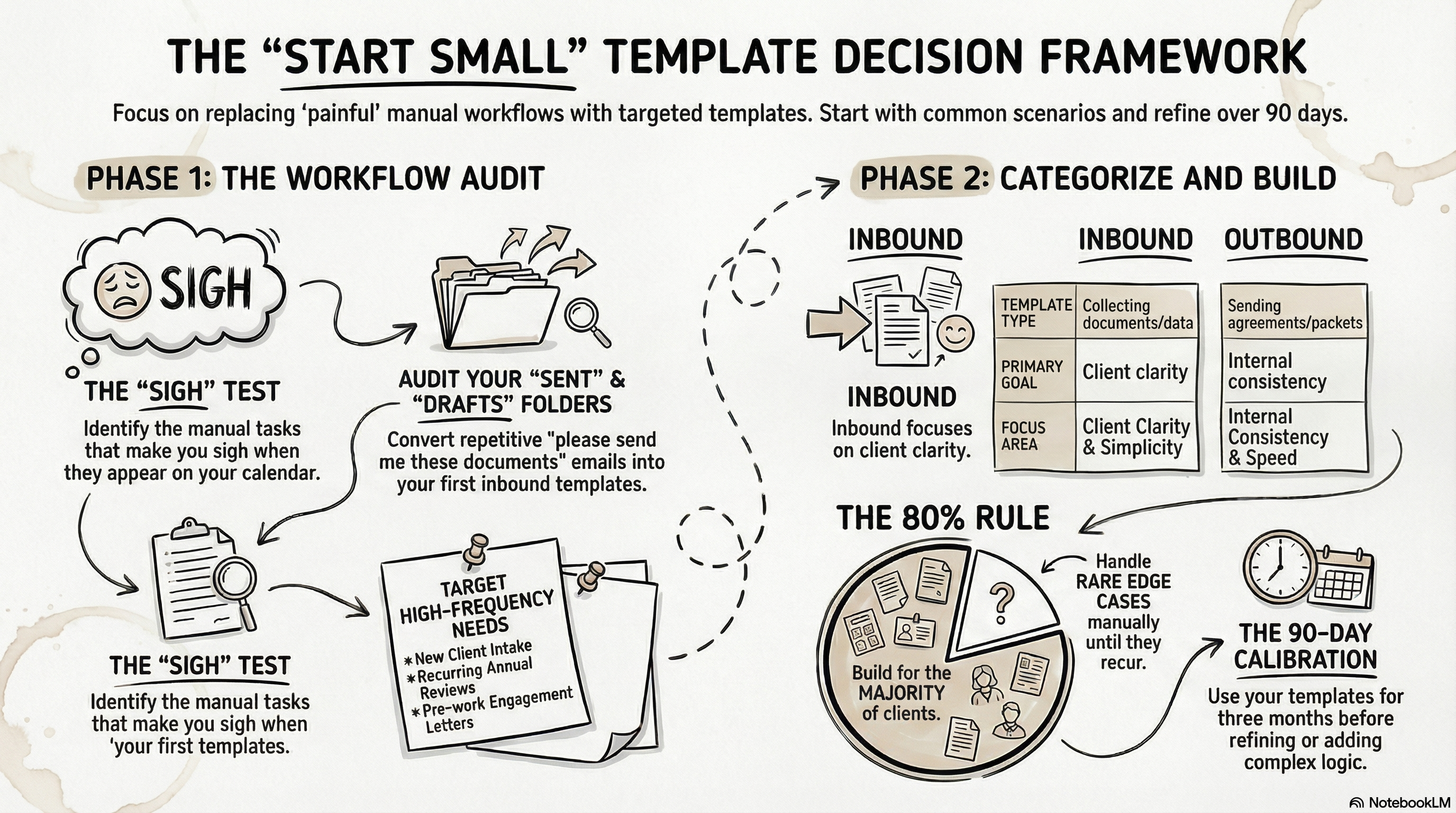
Most solo advisors need 3–5 templates to cover their core workflows: a new client intake (inbound), an engagement letter or service agreement (outbound), and one or two recurring request templates like an annual review prep. Start with whichever one you're currently doing by hand most often — that's your first template.
Connecting...
What Templates Do I Need?
Before you start building in FolioReady, it helps to pause and ask a simple question: what document workflows do you actually run? Not what you wish you had — what you're doing right now, probably by hand, that slows you down every single week.
The answer to that question is your template list. Not a wishlist, not a complete overhaul of how you work — just the workflows you repeat often enough that the manual version is genuinely painful. Start there, and everything else follows naturally.
Why Getting This Right Matters
Templates aren't just forms — they're decisions
Every template you build represents a deliberate choice about how a workflow should run. A well-scoped template is fast to send, easy for clients to complete, and predictable for you to process. An overly broad one feels like a questionnaire. An overly narrow one means you're building five versions of the same thing.
The goal isn't to automate everything at once. It's to identify the handful of workflows that cost you the most time — and replace them with something reliable.
Three ways documents come in
There are three fundamentally different ways documents move between you and your clients, and it's worth keeping them separate in your head. You don't pick one when you build a template — every template can work all three ways — but most templates lean toward one, and that's the workflow to design for.
Inbound — collecting things from clients: documents, signatures, completed forms, identification, financial statements. The friction is on the client's side. Your job is to make that as simple and clear as possible so you get what you need without a back-and-forth email chain.
Outbound — sending things to clients: engagement letters, service agreements, proposals, onboarding packets. The friction is on your side. You're the one assembling and formatting the document before it goes out.
Ingest — accepting documents by email. Instead of sending clients a portal link, you give them an email address — they send their documents as attachments the way they already do. FolioReady creates the folio, stores the files, and runs AI extraction if you've configured it. The friction here is almost zero. You're accepting whatever they send and letting the system organize it. Every template has its own intake address, so this works best when the documents are ad-hoc, the clients prefer email, or you're replacing an existing "just email it to me" workflow.
FolioReady handles all three, but the design thinking is different for each. A template you lean on for inbound lives or dies by its clarity — clients shouldn't need to guess what to upload. Outbound lives or dies by consistency — the right version, with the right content, every time. Ingest lives or dies by simplicity — the email address works, attachments are accepted, and the resulting folio is useful without any manual cleanup.
One template per repeatable workflow
This is the framework that keeps things manageable. If you find yourself wondering whether to combine two workflows into one template or split them apart, ask: do these always happen together, for the same clients, at the same stage? If not, keep them separate.
A new client onboarding template and an annual review document collection template might both pull in similar information, but they happen at different times and serve different purposes. Combining them makes neither one cleaner.
Figuring Out What You Actually Need
Start with your most painful manual process
You probably already know what it is. It might be chasing clients for identification documents every time you onboard someone new. It might be collecting tax returns and statements at the start of a financial planning engagement. It might be getting a signed engagement letter out before you can start work.
Whatever makes you sigh when it comes up in your calendar — that's your first template. Build that one. Get it working, see how it feels, and let it inform the rest.
Ask yourself these questions
What do I collect from every new client? This is almost always a strong candidate for an inbound template. Identification documents, financial statements, existing account information — the intake checklist that you currently send as a bullet-pointed email.
What do I collect at a recurring interval? Annual reviews, tax season document requests, year-end planning — if it happens on a schedule and requires client action, it's worth templating. The template saves you from rebuilding the same request from scratch every time.
What do I send out before I can start work? Engagement letters, service agreements, and fee schedules are strong candidates for outbound templates. If you're typing and reformatting these manually for each client, you're spending time you don't need to.
What currently lives in my email drafts folder? Most advisors have a graveyard of half-written "standard" emails they paste from when onboarding a new client or starting a project. Each one of those is a template waiting to be built properly.
Scenarios to help you think through it
You're a solo advisor just getting started. You probably need two or three templates to start: a new client intake (inbound), an engagement letter (outbound), and possibly an annual review request (inbound). That covers the majority of your document workflow. Build those, use them for a few months, and add more as the gaps become clear.
You serve multiple client types. If your work with business owners looks meaningfully different from your work with retirees, you might need separate onboarding templates for each — not because they're that different, but because the document lists diverge enough that a single combined template would be confusing for clients to navigate.
You're replacing a manual email process. If clients already email you documents as attachments, an ingest template is the closest replacement — clients keep emailing, but now FolioReady catches it, creates a folio, and organizes the files for you. If you want more structure (specific fields, required documents, validation), an inbound template gives you that control instead.
You're handling something compliance-heavy. Document collection for lending, estate planning, or regulatory requirements often involves very specific documents in a specific order. Inbound templates are particularly valuable here because they create a consistent, auditable record of what was requested and what was received.
Practical Recommendations
Start with fewer templates than you think you need. A common mistake is trying to template every edge case before you've even tried the core workflow. Build for the 80% of your clients who go through the same process. Handle the exceptions manually until they happen often enough to justify their own template.
Name templates for the workflow, not the document type. "New Client Onboarding" is clearer than "Document Collection." "Annual Review Prep" is clearer than "Statements and Returns." The name is what clients see — make it obvious what they're being asked to do.
Keep inbound templates focused. Each inbound template should ask for one logical group of related documents. If you're collecting identification and financial statements and account transfers and estate documents all in one template, you've actually got four workflows that happen to be in the same form. That's not wrong if they always go together — but if they don't, break them apart.
Don't over-engineer outbound templates early on. If you're sending out engagement letters, a simple outbound template with your standard content and a signature field is enough to start. You can add conditional logic, variable fields, and additional sections once you understand how clients actually interact with it.
Review what you have after ninety days. After you've run a template through a handful of real client engagements, you'll have a much clearer picture of what's working and what's not. Some things that seemed necessary won't matter. Some gaps will have become obvious. That's the right time to refine — not before you've used it.
💡
Quick answer