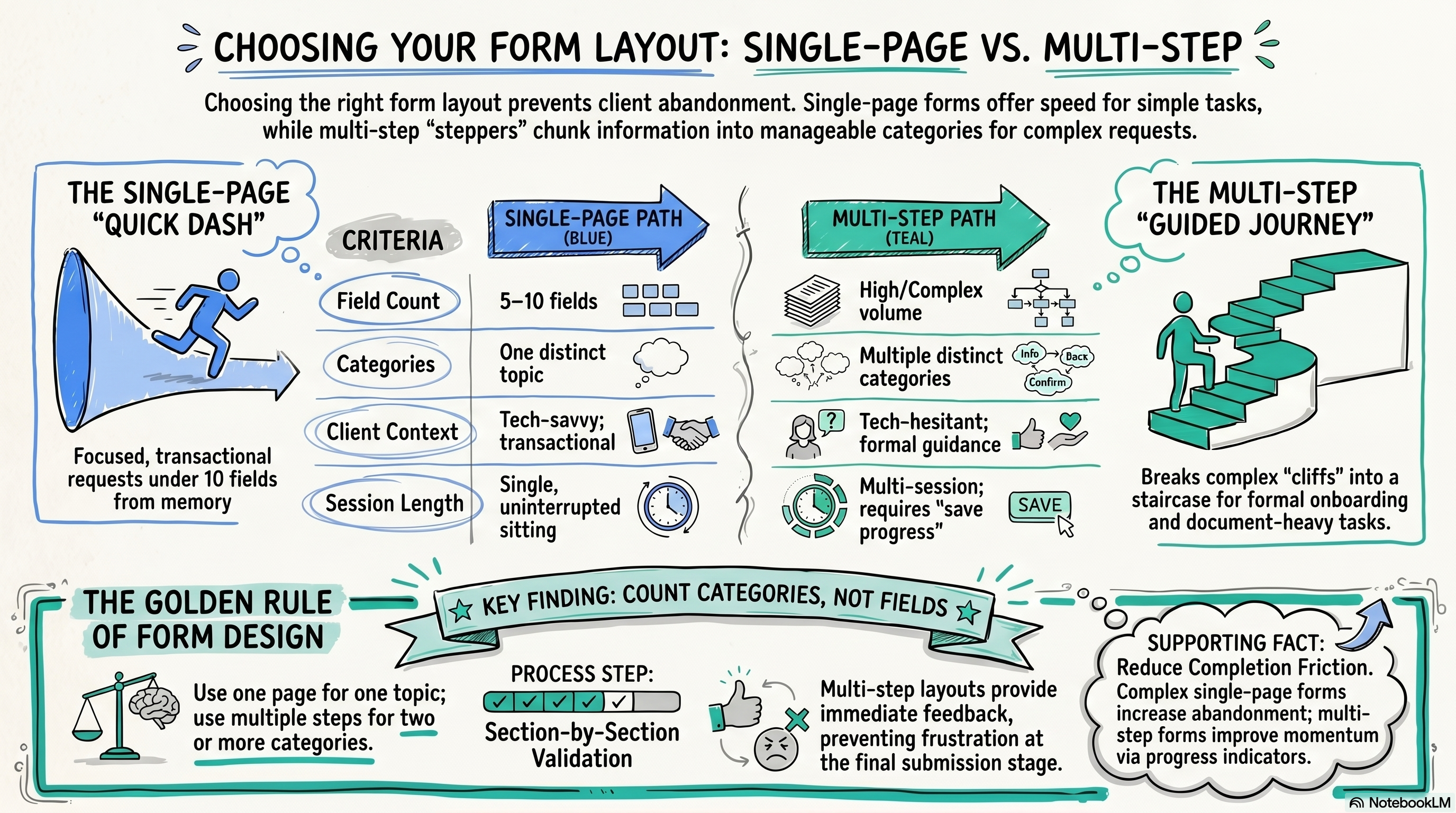
Use a single-page form for focused requests with fewer than ten fields that clients can answer from memory. Use a multi-step form when you're collecting information across multiple categories, especially if clients will need to gather documents or may need to complete the form across more than one session.
Connecting...
Single-Page or Multi-Step Forms?
When you're setting up a new document request in FolioReady, one of the first decisions you'll face is how to structure the form itself. Should everything appear on one scrollable page, or should clients move through a series of steps? It sounds like a small design choice, but it's one that quietly shapes whether clients actually finish what you send them.
There's no universally correct answer — it depends on what you're asking for, who your clients are, and how complex the workflow is. But there are clear patterns that work, and once you understand the reasoning behind them, the decision becomes pretty straightforward.
Why form layout affects completion rates
Here's the thing about forms: clients don't just abandon them because they're too long. They abandon them because the form feels too long, or because they hit a question they can't answer mid-session and don't know how to save progress, or because they open it on their phone and scroll into what feels like an endless page of fields.
A single-page form puts everything in front of the client at once. For simple requests, that's a feature — they can scan ahead, understand the full scope of what's needed, and move through it quickly. For complex requests, it can feel like standing at the base of a cliff.
A multi-step form breaks that cliff into a staircase. Each step has a clear scope ("just your contact details" or "employment history"), and progress indicators give clients a sense of momentum. The psychological effect is real: completion rates on complex forms tend to improve when the work is chunked into manageable pieces. But multi-step forms also add friction at the start — clients have to commit to beginning a process they can't see the end of. For a simple five-field request, that extra structure just gets in the way.
A decision framework
The most useful question to ask yourself is: can a typical client reasonably complete this in one uninterrupted sitting?
Lean toward single-page when:
- The request is focused — five to ten fields covering one topic (a beneficiary update, a simple income verification, a quick authorization)
- Clients can answer every question from memory without needing to dig out documents
- You want the lowest possible barrier to completion — every extra click or page load is a potential exit point
- The request is transactional rather than relationship-building — clients just need to get it done
Lean toward multi-step when:
- You're collecting information across multiple distinct categories (personal info, employment, assets, beneficiaries, signatures)
- Clients will need to pause and gather documents mid-way through — a stepper makes it easier to save progress and return
- The workflow is part of a formal process like onboarding, where walking clients through each section feels like guidance rather than a chore
- You're dealing with clients who aren't especially tech-comfortable — the "what's next" clarity of a stepper reduces confusion
The onboarding case is the clearest example. A new client onboarding form might ask for identity documents, employment history, investment experience, beneficiary information, and a signature — information that spans different parts of a client's life and likely requires them to reference physical documents or check with a spouse. Breaking that into five focused steps isn't just cosmetic. It gives clients a way to complete the form across two sessions without losing their place, and it makes the experience feel guided rather than overwhelming.
A simple suitability update, on the other hand, is a bad fit for multi-step. If you're asking three questions to confirm a client's risk tolerance hasn't changed, adding "Step 1 of 3" navigation is overkill. It slows down something that should take thirty seconds.
Practical recommendations
If you're still unsure after thinking through the scenarios above, here's a rule of thumb that works well in practice: count the distinct categories of information you're collecting, not the number of fields.
One category (even with several fields) works well as a single page. Two or more distinct categories — especially if they involve different documents or different parts of a client's life — is usually a sign that a multi-step form will serve your clients better.
Also consider your client volume and how much time you want to spend on follow-up. Single-page forms on complex requests tend to generate more incomplete submissions — clients start, get stuck on one field, and don't come back. If you're sending the same complex request to dozens of clients at once, the time you spend chasing incomplete forms adds up. A well-structured multi-step form upfront can save you that back-and-forth later.
One more thing worth mentioning: multi-step forms make it easier to validate information section by section, which means clients get feedback about missing or incorrect entries before they've moved on to the next topic. On a single-page form, a client might fill in everything and only discover at submission that something in the middle was wrong. It's a small thing, but it affects how frustrated clients feel at the end of the process.
💡
Quick answer