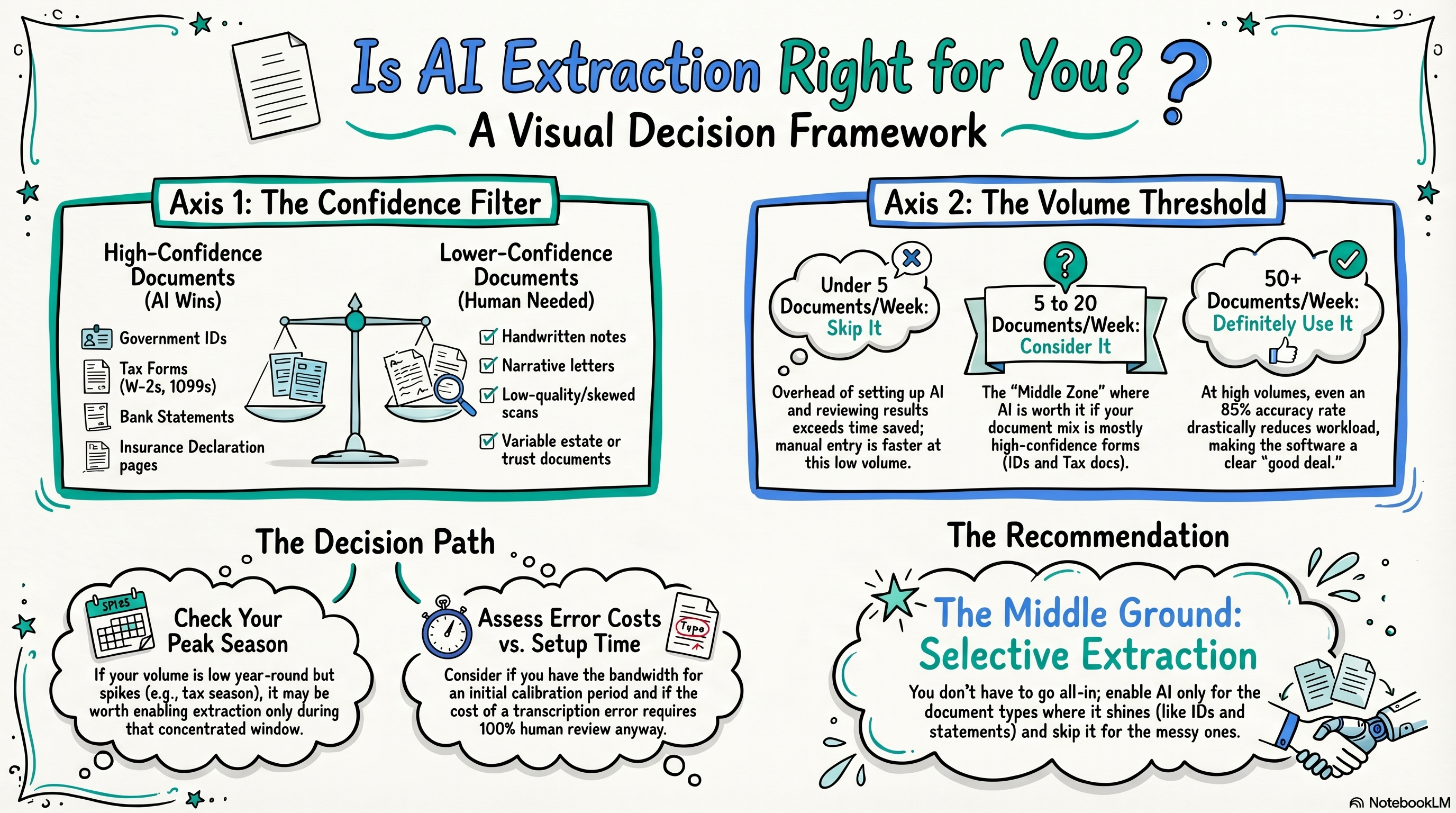
AI extraction is worth it if you're processing 20+ documents per week and most of them are structured formats like tax forms, statements, or government IDs. If your volume is low or your documents are mostly free-form, manual processing is simpler and just as fast. When in doubt, start with selective extraction on your highest-volume document types and see if it saves meaningful time before enabling it broadly.
Connecting...
Is AI Extraction Worth It for My Documents?
Every time a client sends over a stack of documents, you face the same quiet tax: open the file, find the relevant fields, type them in, move on. It doesn't feel expensive in the moment. It rarely does. But if you're collecting documents from 30 or 40 clients, that tax adds up fast — and at some point, having software do the reading starts to look like a genuinely good deal.
AI extraction can pull structured data directly from uploaded documents — account numbers, dates of birth, policy values, tax figures — and populate your records automatically. But it isn't magic, and it isn't free. Whether it's worth turning on depends on what you're collecting and how much of it you're handling.
Why This Actually Matters
The pitch for AI extraction is simple: less manual data entry, fewer transcription errors, faster intake. That's real. A tax preparer who manually types figures from 200 Schedule D forms a year is going to make mistakes, and they're going to lose time they could spend on actual advisory work.
But there's a flip side. AI extraction works best when documents are predictable. The same field in the same place, formatted the same way, every time. When documents vary — unusual formatting, handwritten annotations, non-standard layouts — the extraction confidence drops, and you end up reviewing flagged fields anyway. If you're spending as much time reviewing AI output as you would just entering the data, you haven't actually saved anything.
The honest evaluation isn't "does AI extraction work?" It's "does AI extraction work well enough, on the documents I actually handle, at the volume I actually process?"
What Extracts Well — and What Doesn't
Document type matters more than anything else when predicting extraction quality.
High confidence: structured, standardized documents
These are the documents where AI extraction genuinely shines:
- Government-issued IDs — driver's licenses and passports have consistent layouts and machine-readable zones. Name, date of birth, expiration date, ID number: these extract cleanly and reliably.
- Tax forms — W-2s, 1099s, Schedule Ks, and most IRS forms follow rigid formatting. Field positions are predictable year over year. Extraction accuracy here tends to be high.
- Bank and brokerage statements — major institutions produce statements with consistent templates. Account numbers, balances, transaction summaries, and dates all extract well when the statement comes from a recognized provider.
- Insurance declarations pages — coverage amounts, policy numbers, effective dates. These are typically formatted for easy reading, which also makes them easy for software to parse.
- Mortgage statements and loan documents — standard origination documents from major lenders extract reliably.
Lower confidence: free-form and variable documents
These are the documents where you should temper expectations:
- Handwritten notes or forms — handwriting recognition has improved, but it's still inconsistent. If a client fills out a paper form by hand and scans it, extraction quality depends heavily on legibility and form layout.
- Letters and correspondence — a letter from an attorney or a personal note from a client contains information in narrative form. AI can sometimes surface relevant data, but it isn't reliable for structured field extraction.
- Older or low-quality scans — even a perfectly structured form becomes hard to extract from if the scan is skewed, low-resolution, or heavily compressed.
- Non-standard institutional documents — documents from smaller institutions or international providers often don't match the layouts AI models have learned from. Expect more misses.
- Estate and trust documents — these vary enormously by jurisdiction and drafter. They tend to need a human eye regardless.
The Volume Question
Document type is one axis. Volume is the other — and for most solo advisors, it's the deciding one.
Think about your actual weekly throughput. How many documents are you ingesting from clients in a typical week?
If the answer is fewer than five, manual processing is almost certainly fine. The overhead of reviewing AI extractions, correcting errors, and building familiarity with the feature probably exceeds what you'd save. Do it by hand; it's faster.
If you're handling five to twenty documents per week, you're in the middle zone. The math starts to tilt toward extraction, especially if your document mix is heavy on tax forms, statements, and IDs. But it depends on how much variation you're seeing and how often you're having to correct results.
If you're regularly processing fifty or more documents per week — say, during tax season or a concentrated onboarding push — extraction almost certainly pays for itself. At that volume, even an 85% accuracy rate means you're only manually reviewing 7 or 8 documents out of 50 instead of all 50. That's a meaningful reduction in time spent.
The other factor: seasonal concentration. If you handle most of your document intake in a six-week window around tax season, it may be worth enabling extraction just for that period, even if the annual volume looks modest.
A Simple Decision Framework
Before you flip the switch, it helps to think through a few questions:
What are my most common document types? If the majority are tax forms, ID documents, and statements, extraction will work well. If you're mostly handling letters, handwritten forms, or estate documents, it won't move the needle much.
How many documents am I processing per week at peak? Under five, skip it. Over fifty, definitely use it. Somewhere in between, consider your document type mix.
How much does an error cost me? For some fields — account numbers, tax figures — a transcription error is a serious problem. If you're working in areas where precision is critical and errors are costly, you'll want to review AI extractions carefully regardless. The question is whether reviewed AI output is still faster than fully manual entry.
Am I willing to spend time on initial setup? Getting good extraction results often requires a short calibration period — learning which document types extract reliably for your specific client base, adjusting confidence thresholds, building a review habit. If you're deep in client work and don't have bandwidth to learn a new tool right now, that's a valid reason to wait.
When to Start, When to Skip
Start with extraction if: You handle a regular volume of tax forms, statements, or government IDs. You're processing more than 20 documents a week. You have an upcoming period of concentrated document intake. You've already built a consistent document collection process and want to reduce manual work in a specific step.
Skip extraction for now if: Your document volume is low and irregular. Most of what you collect is correspondence, handwritten forms, or unusual document types. You're still in early stages of building your client intake process. You'd rather spend the setup time on other parts of your practice.
A useful middle path: turn on extraction selectively. Enable it for the document types where it works well — tax forms, IDs, statements — and continue processing other document types manually. You don't have to use it for everything.
💡
Quick Answer