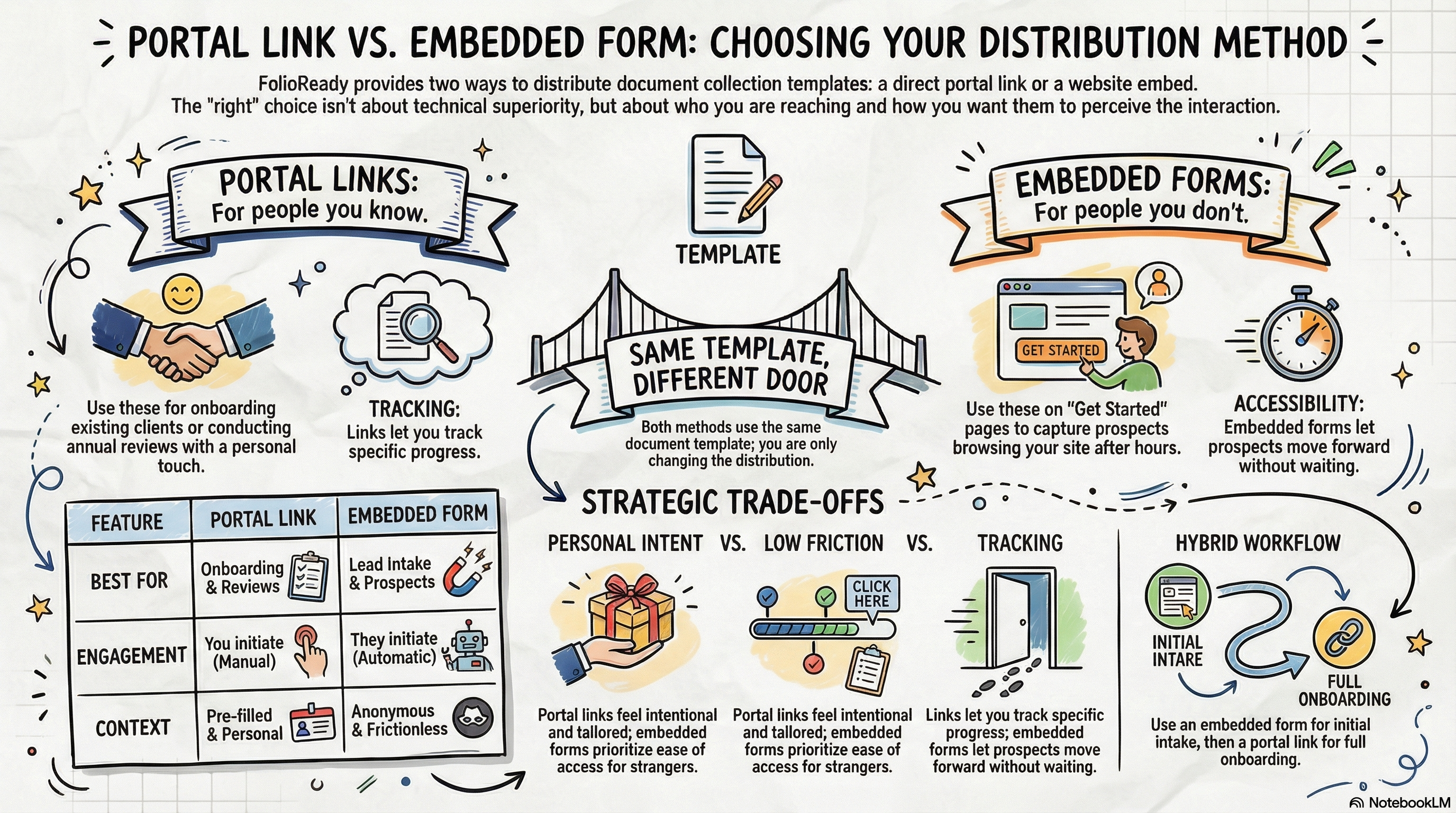
Sending documents to a specific client? Use a portal link. Collecting from anyone who visits your website? Use an embedded form. Same template, different distribution — pick based on who you're trying to reach and how they'll find you.
Connecting...
Embedding Forms on Your Website
When you create a document collection template in FolioReady, you immediately have two ways to put it in front of clients: send them a portal link, or embed the form directly on your website. Neither option is better in the abstract — the right choice depends on who you're collecting from and how you want them to find you.
This isn't a technical setup guide so much as a thinking exercise. Once you're clear on the decision, the mechanics take about five minutes.
Why access method matters more than you'd think
Most advisors focus almost entirely on the form itself — which documents to request, how to phrase the instructions, what order to put things in. That's worth your attention. But how a client reaches that form shapes their first impression before they've read a single field label.
A portal link sent via email feels personal and intentional. The client knows you sent it specifically for them, and they arrive in a dedicated space with their name on it. An embedded form on your website feels more like a front door — open to anyone, low friction, no handholding required. Both experiences can be professional and smooth. They just communicate different things.
The good news: you don't have to choose a method and stick with it forever. The same template powers both. You're not designing two separate experiences — you're deciding how to distribute the one you've already built.
The two approaches
Portal links are unique URLs you generate per client (or share as a general link for a specific purpose). That general link is just your template's slug — folioready.com/folio/your-template-slug, the same short name as its email-ingest address — so it's easy to drop into a signature or onto a card. When you send someone a portal link, they land on a branded page that's scoped to their submission. You can pre-fill their name, add a personal note, and track exactly what they've uploaded. Portal links are ideal for anything relationship-based: onboarding a new client, collecting annual review documents, following up on a specific request.
The trade-off is that portal links require you to initiate the interaction. You're the one sending the link, which means a prospective client browsing your website at 10pm on a Sunday can't submit documents until you've been in touch.
Embedded forms live on a page of your website and are open to anyone who lands there. You add a short snippet of code to a page on your site, and the collection form appears inline — no redirect, no separate login, no friction. Visitors can submit documents as part of their natural browsing experience.
The trade-off here is that embedded forms are inherently less personal. You're not pre-populating anything, and submissions come in without the same context a portal link provides. For prospective clients or intake flows, that's usually fine. For existing clients who expect a tailored experience, a portal link often feels more appropriate.
Where you can embed
FolioReady's embed snippet works with the platforms most advisors are already using:
Wix — Paste the embed code into an HTML element widget. You can drop it anywhere on a page, including inside sections with other content. No plugins required.
WordPress — Use a Custom HTML block in the Gutenberg editor, or paste directly into a page template if you're comfortable with that. The snippet plays well with most themes.
Ghost — Add the code using an HTML card. Ghost's editor handles it cleanly, and the form renders well within Ghost's default layout widths.
Squarespace — Use a Code Block on any page. Squarespace has some restrictions on custom code depending on your plan tier, so check that your plan includes it before you go looking for the snippet.
In all cases, the embedded form inherits your site's surrounding layout, so it doesn't feel bolted on. You may want to adjust the page margins or add a brief intro paragraph above the form — something like "Getting started is simple. Upload your documents below and we'll be in touch within two business days." — but the form itself requires no styling on your end.
How to decide
The clearest way to think about this: portal links are for people you already know, embedded forms are for people you don't yet.
If you're collecting documents from an existing client as part of an ongoing relationship, send a portal link. It's more personal, you get better tracking, and it signals that you're handling their information with intention.
If you're trying to reduce friction for prospective clients — people who've landed on your website and want to move forward without waiting for an email from you — an embedded form on a "Get Started" or "New Clients" page does that job well.
There are scenarios where both make sense at different stages. An advisor might embed a lightweight intake form on their website (name, a couple of questions, maybe one or two documents), then follow up with a portal link once they've had an initial conversation and are ready to do full onboarding. That's a reasonable workflow, and FolioReady supports it without requiring you to build two separate templates.
Practical recommendations
If you work primarily with referrals: You probably don't need an embedded form at all, at least not right away. Your clients come to you through relationships, and portal links are a better fit for that dynamic. Focus on getting your onboarding template right and sending clean, well-labeled portal links.
If you have an active website where prospective clients browse: An embedded form on a dedicated "Get Started" page lowers the barrier to entry meaningfully. People who are ready to move forward don't have to wait for you to reach out first.
If you're not sure: Start with portal links. They're easier to manage, give you more visibility into individual submissions, and let you refine your template before you make it publicly accessible. You can always add an embedded form later once you know exactly what you want to collect.
If you run any kind of public-facing intake — webinar follow-ups, downloadable guides with a document request attached, anything where the audience is "people who expressed interest" rather than "this specific person" — an embedded form is almost always the right call.
💡
Quick answer