Build a template with 5-7 fields covering contact info, household basics, and one open-ended "what's on your mind" question. Use the AI builder to generate a first draft — describe your onboarding process in plain English and trim from there. Add more fields only after you've seen what you actually use.
Connecting...
Designing Your First Template
When you sit down to build your first client intake template, the instinct is almost universal: open a blank form and start recreating the paper version you've been using for years. Date of birth, spouse's name, current employer, beneficiary designations — the whole stack. It feels responsible. Thorough. Professional.
But that instinct is worth questioning. Your paper form was designed for a different era, a different workflow, and probably a different version of your practice. Before you replicate it field by field, it's worth asking: what do I actually do with this information once I have it?
Every Field Is a Decision
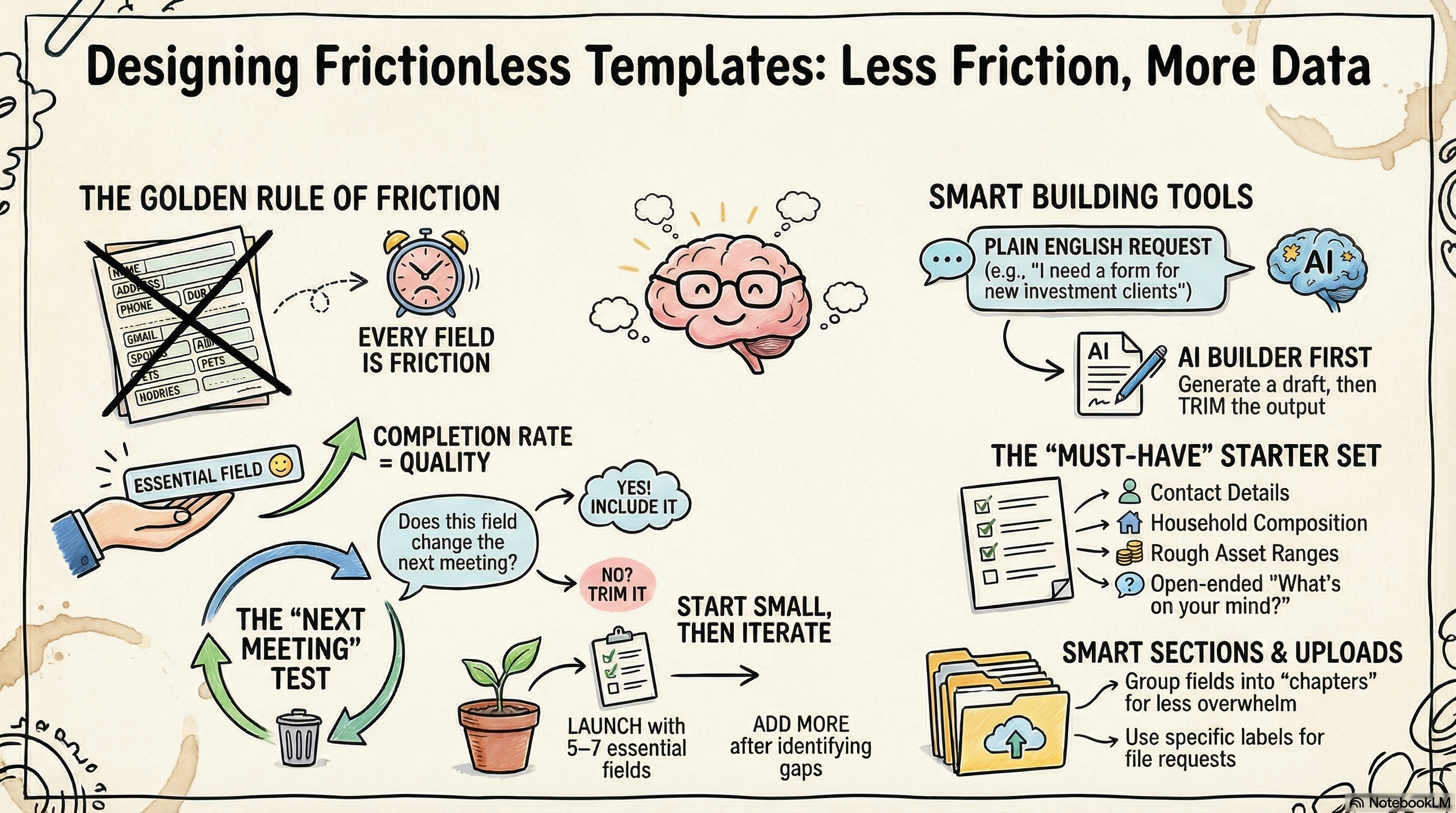
There's a simple truth about forms that most advisors don't think about until completion rates start slipping: every field you add is friction. Not a lot of friction on its own, but it accumulates. A client staring at a 40-field form on their phone, trying to remember their exact account numbers and policy details, is a client who sets the form aside and doesn't come back to it for a week.
The goal of a good template isn't to capture everything upfront. It's to capture the right things at the right time — ideally the things you need before the next conversation, not an exhaustive record of everything you might ever want to know.
When a client completes a shorter, well-designed form quickly, you get real data. When they abandon a longer one, you get nothing. Completion rate is a proxy for template quality.
This doesn't mean asking for less — it means asking for what you'll actually use. The fields you include should each have a clear answer to: "What would I do differently in my next meeting if I had this?"
What You Can Build With
FolioReady templates support a flexible set of building blocks, and it helps to know what's available before you start designing.
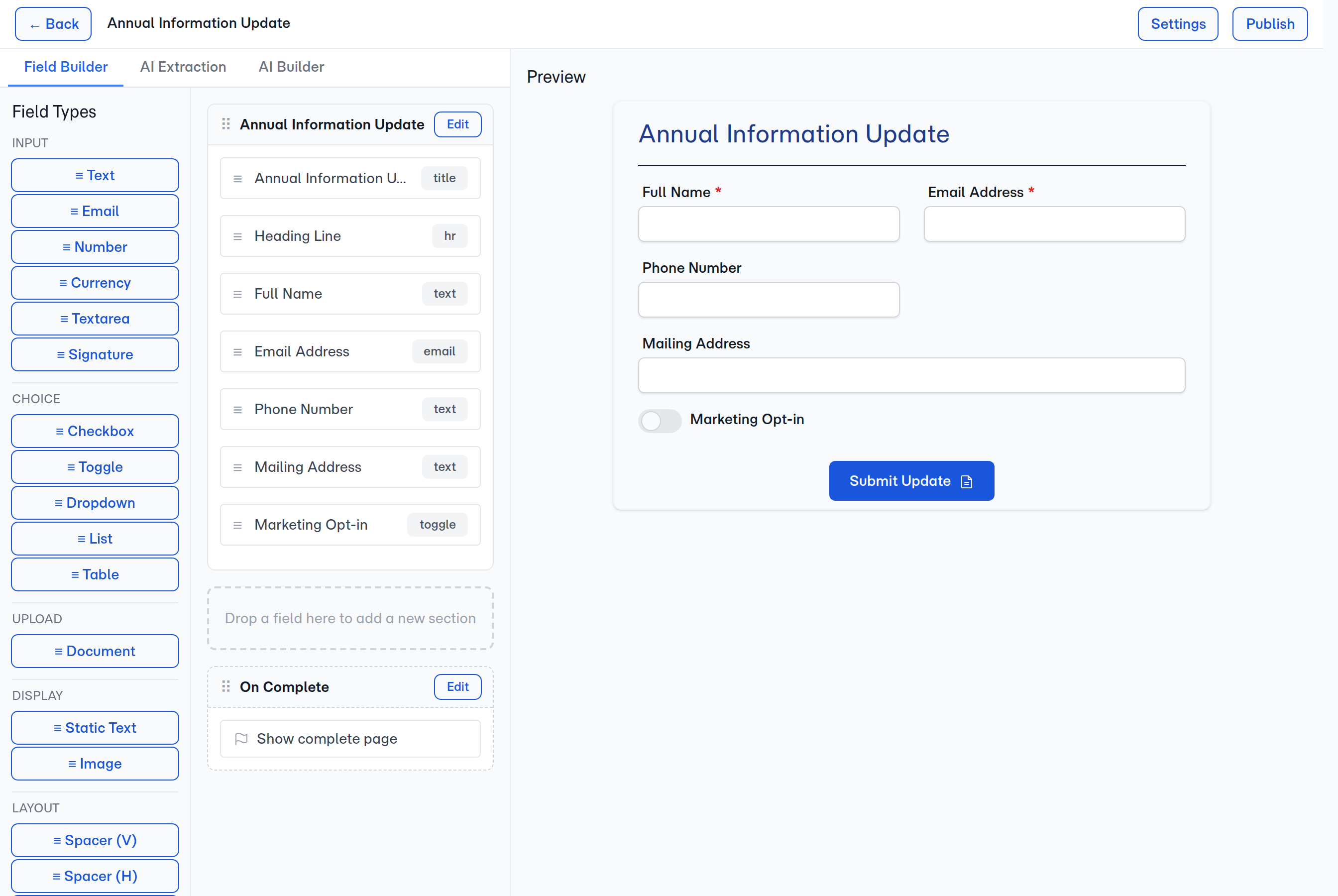
Field types cover the basics: short text (names, addresses), long text (open-ended questions or explanations), numbers, dates, dropdowns, checkboxes, yes/no toggles, and phone or email fields with built-in validation. You can mark any field as required or optional, and add helper text that appears below the field to guide clients as they fill things out.
Sections let you group related fields under a heading. Think of them as chapters — "About You", "Your Finances", "Your Goals". Sections help clients understand where they are in the form and make longer templates feel less overwhelming. They also make your templates easier to manage as you iterate over time.
File uploads let clients attach documents directly to their submission — think tax returns, recent statements, existing policy documents, or ID verification. You can specify what file types are accepted and whether an upload is required. File requests work best when the label is specific: "Upload your most recent tax return (Form 1040)" lands better than "Upload tax documents".
The AI Builder
If you're not sure where to start, or you want to get a working draft quickly, the AI builder is worth using before you try to design manually.
Describe what you need in plain English. Something like: "I want to gather basic personal information, understand their current retirement savings, and find out what their main financial concerns are." The builder will generate a template from that description — field types, section structure, helper text, the works.
You can describe what you need at the moment you create the template — the New Template modal has a one-line prompt field, and so does the Wix panel's Edit template screen. Either entry point opens the builder with that prompt already running, so by the time you arrive there's a draft on the page to react to. If you'd rather start blank and iterate, leave the prompt empty and use the chat panel inside the builder later.
The output isn't always perfect, and you'll likely want to trim or adjust things. But it gives you something concrete to react to, which is usually faster than building from scratch. It's also good at suggesting fields you might not have thought of, and at organizing things in a logical flow for clients.
Treat the AI-generated template as a starting point, not a finished product. Go through each field and ask whether you'd actually use the answer. Delete anything that doesn't pass that test.
What to Include, What to Leave Out
A useful way to approach this: think about your next ten onboarding meetings. What information would change how you prepare, what questions you ask, or what you recommend? Those fields belong in your template.
Some things are almost always worth capturing upfront: contact details, household composition, rough income or asset range, retirement timeline, and an open-ended field for what's on their mind. These give you enough context to have a real conversation.
Other things can wait — or might be better gathered conversationally. Exact account numbers, detailed beneficiary information, and policy specifics can feel invasive early in a relationship and often require clients to dig through paperwork. Consider whether you need those details before the first meeting, or whether they can come later in the process.
A few questions worth asking yourself as you review each field:
- Would I feel awkward asking this at the start of a first conversation?
- If a client left this blank, would it actually affect anything?
- Is there a downstream system that needs this data, or am I collecting it out of habit?
If the honest answer to any of those is "not really," cut the field.
Start Small, Then Iterate
The advisors who end up with the most useful templates are the ones who resist the urge to get everything right on the first try. Start with five to seven fields — enough to make the conversation productive, not so many that you're asking clients to do significant homework before you've even met.
After your first few submissions, look at what you actually referenced. Which answers did you pull up before the meeting? Which ones sat unread? That usage pattern is more honest than any amount of upfront planning.
From there, add fields one at a time as you identify genuine gaps. It's much easier to add a field you realize you need than to convince clients a shorter form is coming after they've already experienced a long one.
Templates aren't meant to be set once and forgotten. The best ones evolve with your practice — as your client base shifts, as your process tightens, as you figure out what information actually moves the needle in your work.
💡
Quick answer if you're just getting started